

Here’s a situation most beginners find themselves in: you’ve decided to start a website, you’ve picked a name, you’ve chosen a platform – and then you hit the hosting decision and everything grinds to a halt.
Suddenly, you’re reading about shared hosting, VPS, cloud servers, uptime percentages, NVMe SSDs, and CDN integrations. None of it was in any beginner guide you read before. And every hosting provider’s pricing page looks almost identical, which makes it impossible to know whether you’re making a smart choice or an expensive mistake.
This guide is written specifically for that moment. It explains web hosting in plain English, shows you exactly what features matter for a beginner and which ones don’t, warns you about the pricing traps most beginners fall into, and gives you a clear recommendation on the best web hosting for beginners in 2026 — so you can make a decision and move on.
What this guide covers: Plain-English hosting education
What web hosting actually is — The 5 hosting types explained simply — The 7 features every beginner needs — The 3 biggest pricing traps to avoid — Our top recommendation with reasoning
What Is Web Hosting and Why Does It Matter?
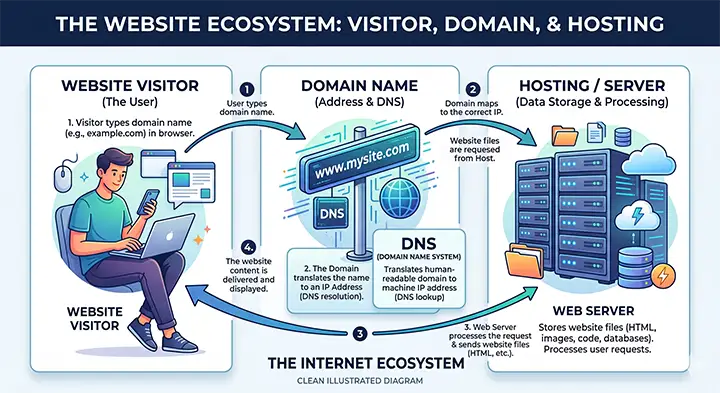
Web hosting is the service that stores your website’s files — the text, images, pages, and code — and makes them accessible to anyone who visits your site online. Without hosting, your website simply doesn’t exist on the internet.
Think of it this way: your domain name (like rexohub.com) is your address. It tells people where to find you. Your hosting is the actual property — the building where everything lives. When someone types your domain into a browser, it sends them to your hosting server, which serves up your website in seconds.
Why does your choice of hosting matter so much? Because it directly affects three things that determine whether your website succeeds or struggles:
- Speed: How fast your pages load. A site that takes more than 3 seconds to load loses a significant portion of visitors before they even see your content — and Google ranks slow sites lower in search results.
- Reliability: How often your site is actually online and accessible. A host with poor uptime means your site goes offline regularly, costing you visitors, trust, and potential revenue.
- Security: How well your site is protected against hacks, malware, and data loss. A good host handles most of this for you. A bad host leaves you exposed.
Most beginners underestimate how much hosting matters until something goes wrong. Choosing well from the start means you never have to think about it again.
The 5 Types of Web Hosting Explained Simply
You’ll encounter five main types of hosting when you start researching. Here’s what each one means in plain English:
Hosting Type | Monthly Cost | Best For | Technical Skill Needed |
Shared Hosting | $1.99 - $8/mo | Blogs, small sites, first websites | None - beginner friendly |
WordPress Hosting | $3 - $15/mo | WordPress sites, bloggers, affiliates | Very low - mostly managed |
VPS Hosting | $10 - $40/mo | Growing sites with more traffic | Moderate - some setup needed |
Cloud Hosting | $10 - $30/mo | Scalable eCommerce, high traffic sites | Low to moderate |
Dedicated Server | $80 - $200+/mo | Large enterprise sites | High - not for beginners |
Which hosting type do you actually need as a beginner?
For the vast majority of beginners — whether you’re starting a blog, an affiliate site, a portfolio, or a small business website — shared hosting or WordPress hosting is the right choice. Both are affordable, beginner-friendly, and more than capable of handling a new site’s traffic needs.
You don’t need VPS hosting, cloud hosting, or a dedicated server when you’re just starting out. Those are for sites with established traffic and specific technical needs. Buying more hosting power than you need at this stage is just wasted money.
Simple rule for beginners: Start with shared or WordPress hosting
If you’re building a blog, affiliate site, or small business site: start with shared hosting or managed WordPress hosting. Upgrade only when your site has consistent traffic and you’re hitting the limits of your current plan. That might be 12 months from now – or 3 years.
7 Features Every Beginner Needs in a Web Host
Not every feature a hosting provider advertises is actually important for a beginner. Here are the seven features that genuinely matter — and a full checklist you can use when comparing providers:
Must Have? | Feature | What to look for |
Yes | Free SSL certificate | Non-negotiable. If a host charges extra for SSL, skip it. |
Yes | One-click WordPress install | Should take 2 minutes, not 2 hours. |
Yes | Automatic backups | Daily backups included in the plan, not as a paid add-on. |
Yes | 24/7 customer support | Live chat preferred. Test it before you buy. |
Yes | Free domain (first year) | Most beginner plans include this. Saves $10-15. |
Yes | Uptime guarantee of 99.9%+ | Below this, your site will have regular downtime. |
Yes | SSD storage | Below this, your site will have regular downtime. |
No | Unlimited everything | Marketing language. Check actual resource limits in the plan. |
No | Phone support | Useful but not essential if live chat is responsive. |
No | Free website migration | Helpful if switching from another host, not needed for new sites. |
Free SSL certificate
SSL is what puts the padlock icon in your browser’s address bar and makes your URL start with ‘https’ instead of ‘http’. It encrypts the connection between your site and your visitors, which is a basic security standard in 2026. Google also uses HTTPS as a ranking factor — without SSL, your site may rank lower than competitors who have it. Every reputable beginner host includes SSL for free. If you find one that charges extra for it, that’s a red flag.
One-click WordPress installation
WordPress powers over 40% of all websites, and it’s the most common platform for blogs, affiliate sites, and business websites. Every beginner-friendly host should let you install WordPress in a few clicks — not through a complicated technical process. If a host makes WordPress installation confusing or time-consuming, that’s a sign the whole experience will frustrate you.
Automatic daily backups
Backups are your safety net. If something goes wrong — a plugin conflict, a hack, an accidental deletion — backups let you restore your site to a working version. Look for hosts that include automatic daily backups in the plan price, not as a paid add-on. Some hosts charge $2-3 extra per month for backups, which adds up and should have been included from the start.
24/7 customer support
When something breaks on your site, you want help immediately — not in 48 hours via email ticket. Look for hosts that offer 24/7 live chat support. Before you buy, send them a test question through their chat and see how quickly and helpfully they respond. This one test tells you more about a host’s support quality than any review article.
Uptime guarantee of 99.9% or better
Uptime is the percentage of time your site is actually online and accessible. A 99.9% uptime guarantee sounds almost perfect, but it still allows for about 8 hours of downtime per year. Any host that guarantees less than 99.9% is telling you upfront that your site will go offline regularly. Look for this guarantee in the plan details, not just the marketing page.
3 Pricing Traps That Catch Most Beginners
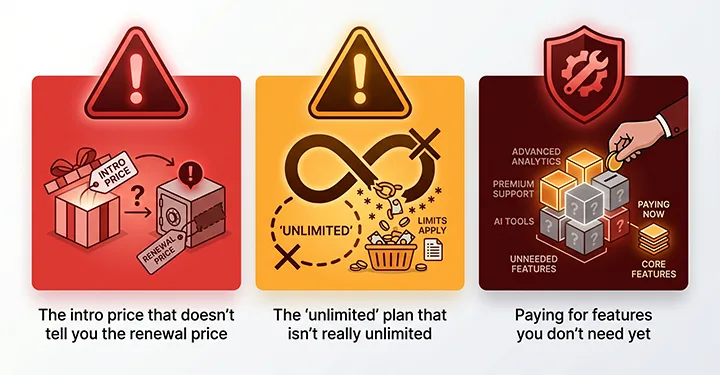
The web hosting industry has some pricing practices that genuinely catch beginners off guard. These three are the most common — and the most expensive if you don’t know about them.
Trap 1: The intro price that doesn’t tell you the renewal price
This is the most widespread trap in the hosting industry. You see an offer like ‘$1.99/month’ and sign up, only to find that after your first year, the price jumps to $8, $10, or even $15 per month. The hosting provider did advertise the renewal price — usually in small print somewhere — but most beginners don’t notice it.
Before signing up with any host, search for ‘[host name] renewal price’ and check what you’ll actually pay from year two onwards. This one check can save you from an unpleasant surprise.
Warning: Always check renewal pricing
Hostinger’s entry plans renew at around $11.99/month after the promotional period. SiteGround’s introductory price can jump from $3.99 to $17.99/month on renewal. Neither is dishonest — the prices are disclosed — but most beginners don’t check. Always look up the renewal rate before committing to a multi-year plan.
Trap 2: The ‘unlimited’ plan that isn’t really unlimited
‘Unlimited bandwidth’, ‘unlimited storage’, ‘unlimited websites’ — these claims appear on most entry-level hosting plans. In practice, ‘unlimited’ usually means ‘no hard limit, but we’ll throttle or suspend you if you use too much’.
Shared hosting servers have physical resource limits. If your site suddenly gets a large amount of traffic, a ‘unlimited’ plan won’t protect you from slowdowns or suspension. For a new site with low traffic, this isn’t a real problem — but it’s worth understanding what ‘unlimited’ actually means before you rely on it.
Trap 3: Paying for features you don’t need yet
Hosting providers make it easy to upsell you on extras during checkout — site security add-ons, domain privacy, SEO tools, dedicated IP addresses, professional email. Some of these are worth having eventually, but most beginners don’t need them on day one.
Domain privacy (which hides your personal information from public domain records) is worth the small annual fee. The rest can wait until you have a reason to add them. Don’t check every optional add-on at checkout just because it sounds useful.
The Best Web Hosting for Beginners in 2026: Our Recommendation
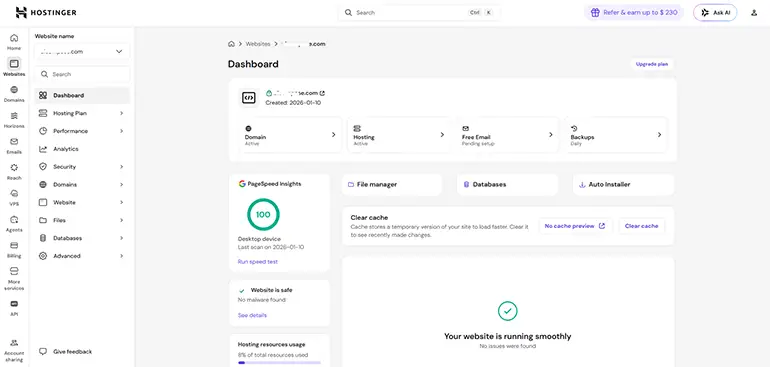
Based on our research and the criteria above, Hostinger is our top recommendation for beginners in 2026. Here’s the honest reasoning behind that choice.
- Price: Entry plans start under $3.99/month with a promotional rate, renewing at around $11.99/month. That’s genuinely affordable compared to most competitors.
- Ease of use: Hostinger uses its own custom control panel (hPanel) instead of the dated cPanel interface. It’s cleaner, faster, and significantly easier for beginners to navigate.
- WordPress setup: One-click WordPress installation takes about 2 minutes. The onboarding flow is designed for people who haven’t done this before.
- Free domain: Most plans include a free domain for the first year, which removes one more decision from your setup process.
- Support: 24/7 live chat support with response times typically under 5 minutes. This is where Hostinger genuinely outperforms many competitors.
- SSL and backups: Both included in all plans at no extra charge.
Top Pick for Beginners: Hostinger
Beginner-friendly hosting with a clean dashboard, fast support, free SSL, free domain, and affordable pricing. Starts under $3.99/month.
Get started -> hostinger.com (Get an extra 20% discount)
When Hostinger might not be the right choice
Hostinger is strong for most beginners, but it’s not perfect for every situation. If you need phone support specifically, Hostinger doesn’t offer it – GoDaddy or Bluehost would be better options. If you’re building a high-traffic eCommerce store from day one and expect significant volume quickly, Cloudways or Bluehost’s higher-tier plans offer better performance. And if you’re on a truly tight budget and primarily care about low cost, Bluehost’s promotional pricing is sometimes lower than Hostinger’s.
For the majority of beginners starting a blog, affiliate site, or small business website, Hostinger covers every need without overcomplicating things.
Frequently Asked Questions
What is the difference between a domain name and web hosting?
Your domain name is your website’s address — the URL people type to find you, like rexohub.com. Your web hosting is where your website’s files actually live — the server that stores and serves your site when someone visits. You need both to have a working website. Most beginner hosting plans let you buy both from the same provider, which simplifies the setup process.
How much does web hosting cost for a beginner?
Entry-level shared hosting typically costs between $2 and $8 per month, depending on the provider and whether you’re on a promotional rate. Most beginner-friendly plans include a free domain for the first year, which brings your first-year total to roughly $25-60. Remember to check the renewal price, which is often higher than the introductory offer.
Is shared hosting good enough for a beginner website?
Yes — for most beginner sites, shared hosting is more than adequate. A new blog, affiliate site, or small business website with low to moderate traffic will run comfortably on shared hosting. You would only need to upgrade to a higher hosting tier if your site is consistently receiving tens of thousands of visitors per month or running resource-intensive features like a large eCommerce store.
Can I move my website to a different host later?
Yes, switching hosts is possible at any point. Most hosting providers offer free website migration as part of their onboarding process. That said, it’s always easier to choose the right host from the start — migrations add technical complexity and a brief period of potential downtime. Choose a host you’re confident in rather than planning to switch later.
Do I need technical skills to set up web hosting?
No. The beginner-friendly hosts recommended in this guide — Hostinger, Bluehost, and SiteGround — all have guided setup processes designed for people with no technical background. Installing WordPress, connecting your domain, and getting your site live can all be done through simple interfaces without touching any code or server settings.
Ready to Choose the Best Web Hosting for Beginners?
Choosing web hosting doesn’t need to be complicated. You now know what hosting actually does, which type fits a beginner site, the seven features that genuinely matter, and the three pricing traps to avoid before you sign up.
The most important thing is to make a decision and start. A site on imperfect hosting is infinitely more valuable than a perfect hosting plan sitting unused while you keep researching.
If you want to see how hosting fits into the full picture of building your first website, read our step-by-step guide on how to start an online business. And when you’re ready to compare specific hosting providers side by side, browse the RexoHub hosting reviews for honest breakdowns of each provider’s strengths, weaknesses, and real pricing.
Your next step: Start with Hostinger
Go to hostinger.com, pick the Premium Shared Hosting plan (it supports multiple sites and includes daily backups), use the referral code rexohub to get 20% extra discount at checkout, and you’ll have your site up and running today. The setup process takes under an hour from domain registration to a live WordPress site.
