
You have built a website. Maybe it is a blog, a small business site, or an online store. You are publishing content, adding pages, and doing everything you think is right. But weeks go by and Google just does not seem to notice you exist.
Sound familiar?
The missing piece for most beginners is not effort. It is visibility. And that is exactly what SEO tools help you with.
If you have been asking yourself, ‘what are SEO tools and do I really need them?’ – you are in the right place. This guide breaks it all down in plain language. No expensive software pushed in your face. Just a clear, honest explanation of what these tools do, which types exist, and where a beginner should start.
What Are SEO Tools, Exactly?
SEO stands for Search Engine Optimization. It is the process of making your website more visible when people search for things related to your content on Google, Bing, or other search engines.
SEO tools are software applications (or websites) that help you do that job better and faster. Instead of guessing what Google wants, these tools give you real data: which keywords people are searching for, how your site is performing, what your competitors are doing, and what technical problems might be hurting your rankings.
Think of SEO tools the same way a mechanic thinks about diagnostic equipment. A good mechanic can inspect a car by eye, but the diagnostic tool shows exactly where the problem is in seconds. SEO tools work the same way for your website.
Simple Definition
SEO tools are software platforms that help you research keywords, track rankings, fix technical site issues, analyze backlinks, and optimize your content — so your website ranks higher in search results.
Why Do Beginners Actually Need SEO Tools?
You might be thinking: ‘Can’t I just write good content and wait for Google to find it?’ Technically, yes. But without data, you are flying blind.
Here is what happens when beginners skip SEO tools:
- They write content around keywords no one is actually searching for
- They miss easy technical fixes that prevent Google from even reading their pages
- They have no idea whether their rankings are going up or down
- They waste months of effort on strategies that are not working
SEO tools replace guesswork with data. And the good news is that some of the most powerful ones are completely free.
For bloggers, affiliate marketers, small business owners, and anyone running a WordPress website, having even a basic SEO toolkit gives you a real edge over others who are just writing and hoping.
The Main Types of SEO Tools (And What Each One Does)
Not all SEO tools do the same thing. They are built for different tasks. Here is a breakdown of the main categories every beginner should know about.
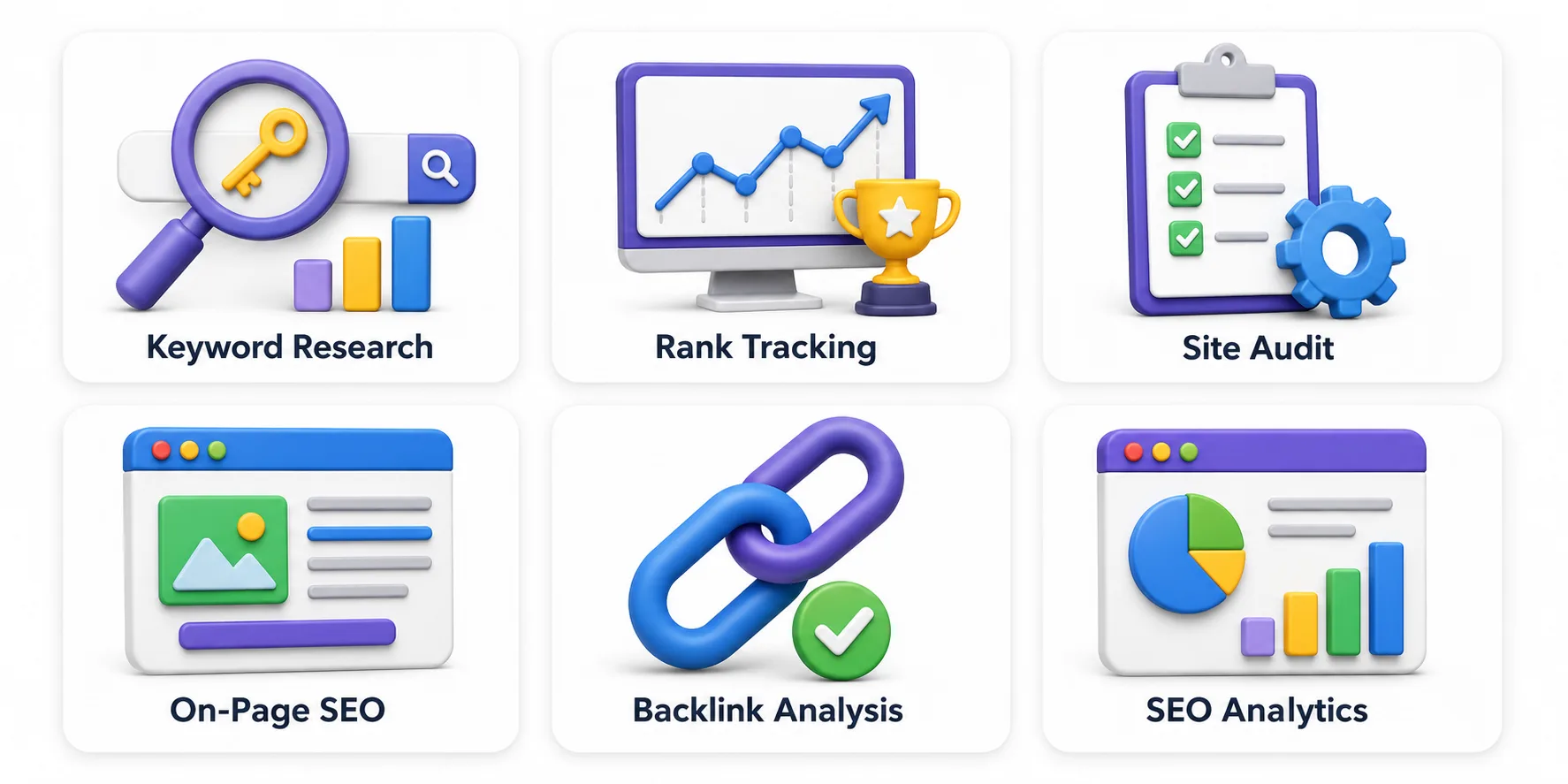
1. Keyword Research Tools
These tools help you find what people are actually typing into Google. They show you search volume (how many people search for a term each month), keyword difficulty (how hard it is to rank for that term), and related keyword ideas.
Without keyword research, you might write a 2,000-word article that nobody ever searches for. With it, you target terms that have real traffic potential.
- Examples: Google Keyword Planner, Ahrefs, Semrush, Ubersuggest, AnswerThePublic
- Best for: Bloggers, affiliate marketers, content creators
2. Rank Tracking Tools
Once your content is published, you want to know where it appears in search results. Rank tracking tools monitor your keyword positions on Google (and sometimes Bing) over time, so you can see if your SEO efforts are working.
If you published an article targeting ‘best budget laptops’ and it started at position 45 but moved to position 12 over two months, rank tracking shows you that progress.
- Examples: Google Search Console, SE Ranking, Semrush, Mangools
- Best for: Anyone who has published at least a few pages and wants to track growth
3. Site Audit Tools (Technical SEO Tools)
These tools scan your entire website and report on technical issues that could be hurting your rankings. Things like broken links, missing meta descriptions, slow page speed, duplicate content, and crawl errors.
Google needs to be able to read and index your website before it can rank it. Technical SEO tools make sure nothing is blocking that process.
- Examples: Screaming Frog (free for up to 500 URLs), Google Search Console, Ahrefs Webmaster Tools
- Best for: Anyone with a website that has been live for a while but is not getting traction
4. On-Page SEO Tools
On-page SEO tools focus on individual pages. They check whether you are using your target keyword correctly, whether your headings are structured well, and whether your meta title and meta description are properly written.
For WordPress users, plugins like Yoast SEO and Rank Math do this job right inside your editor, giving you a checklist as you write.
- Examples: Yoast SEO, Rank Math, Surfer SEO, Clearscope
- Best for: WordPress website owners and content writers
5. Backlink Analysis Tools
A backlink is a link from another website to yours. Google treats backlinks like votes — the more quality sites link to you, the more trustworthy your site looks.
Backlink analysis tools show you who is linking to your website, how many backlinks you have, and what your competitors’ link profiles look like. This helps you find opportunities to earn more links.
- Examples: Ahrefs, Semrush, Ahrefs Webmaster Tools (free), Moz Link Explorer
- Best for: Sites in competitive niches that want to understand their link profile
6. SEO Analytics and Reporting Tools
These tools give you a big-picture view of your website’s performance. Traffic, user behavior, search queries, and goal tracking. Google Analytics and Google Search Console work together to give you a free, complete SEO reporting setup.
- Examples: Google Analytics 4, Google Search Console, Semrush
- Best for: Everyone — these should be set up on every website from day one
Free vs. Paid SEO Tools: What Is the Real Difference?
One of the most common questions from beginners is whether free SEO tools are good enough to start. The honest answer is: yes, for most of what you need as a beginner.
Here is a side-by-side look at what free tools give you compared to paid ones:
Feature | Free Tools | Paid Tools |
Keyword research | Limited searches/day | Unlimited + advanced filters |
Rank tracking | Manual via GSC | Automated daily updates |
Site audit depth | Basic (GSC errors) | Full crawl + prioritized fixes |
Backlink data | Limited (Ahrefs free tier) | Full database access |
Competitor analysis | Not available | Available |
AI content help | Very limited | Built-in AI features |
Cost | Free forever | $29–$200+/month |
The recommendation here is clear: start free. Set up Google Search Console and Google Analytics first. Use Google Keyword Planner for keyword ideas. Once you hit 30 to 50 published articles and want to scale faster, then consider a paid tool.
Beginner’s Rule
Do not pay for an SEO tool until you have used the free ones for at least 60 days. The free stack (Google Search Console + Google Analytics + Keyword Planner) covers everything you need to get started and see early results.
Your First Beginner SEO Toolkit: Start With These 5 Tools
If you are starting from zero, here is the exact toolkit to set up. All of these are free or have generous free tiers.
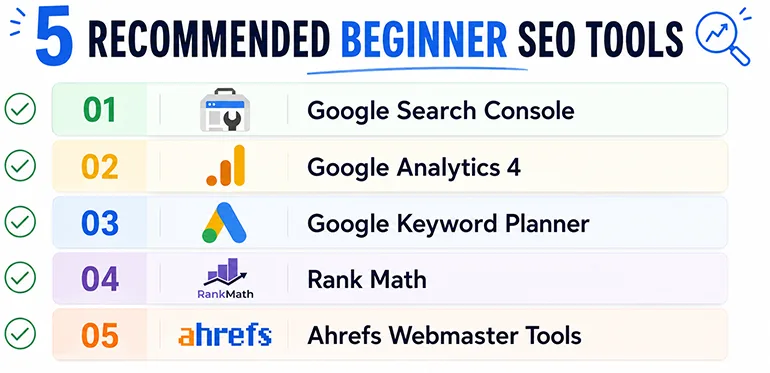
1. Google Search Console (Free — Must Have)
This is the single most important tool for any website owner. Google Search Console shows you which keywords bring visitors to your site, how many clicks and impressions you are getting, which pages Google has indexed, and any technical errors Google has found. Because the data comes directly from Google, it is more accurate than any third-party tool.
How to start: Visit search.google.com/search-console and verify your website. It is free and takes about 10 minutes to set up.
2. Google Analytics 4 (Free — Must Have)
While Search Console tells you how your site performs in search, Google Analytics tells you what visitors do once they arrive. Which pages they read, how long they stay, where they came from. Together, these two tools give you a complete picture of your organic search performance at zero cost.
3. Google Keyword Planner (Free)
Keyword Planner is part of Google Ads, but you do not need to run ads to use it for keyword research. It shows you estimated monthly search volumes and related keyword ideas — straight from Google’s own data. It is the most beginner-friendly keyword research tool available for free.
4. Yoast SEO or Rank Math (Free — WordPress Only)
If your website runs on WordPress, install either Yoast SEO or Rank Math. Both are free plugins that give you on-page SEO guidance as you write. They check your keyword usage, readability score, meta title, meta description, and heading structure — all in real time inside your editor.
5. Ahrefs Webmaster Tools (Free)
Ahrefs offers a free tier through their Webmaster Tools program. You can verify your own website and get access to basic backlink data and a limited site audit. It is not as powerful as the paid version, but it is a solid free upgrade once you have Search Console set up.
Quick Reference: Popular SEO Tools by Category
Here is a handy reference table to bookmark as you explore further:
Tool | Category | Free Plan? | Best For |
Google Search Console | Rank Tracking + Analytics | Yes (free) | Every website owner |
Google Analytics 4 | SEO Analytics | Yes (free) | Traffic + behavior data |
Google Keyword Planner | Keyword Research | Yes (free) | Basic keyword ideas |
Ahrefs Webmaster Tools | Backlink + Audit | Yes (limited) | Backlink overview |
Screaming Frog | Technical SEO | Yes (500 URLs) | Site crawl + audits |
Yoast SEO | On-Page SEO | Yes (WordPress) | Content optimization |
Rank Math | On-Page SEO | Yes (WordPress) | Advanced on-page checks |
Ubersuggest | Keyword Research | Yes (limited) | Beginner keyword ideas |
Semrush | All-in-One | Trial available | Full SEO toolkit |
Mangools / KWFinder | Keyword Research | Trial available | Affordable beginner suite |
Surfer SEO | On-Page + AI | No free plan | Content optimization |
SEO Tools vs. Doing SEO Manually: Is There a Difference?
You can do SEO without tools. Some people learn to research keywords using just Google’s autocomplete, study competitors by manually reading their pages, and track rankings by searching Google in a private window.
This works, but it is extremely slow. SEO tools automate and scale the work. What might take three hours manually can be done in 15 minutes with the right search engine optimization software.
For small business owners and bloggers with limited time, tools are not a luxury. They are a practical necessity. The free ones especially have no downside. They remove the busywork so you can focus on creating content and building your site.
What About AI SEO Tools? Are They Worth It for Beginners?
AI SEO tools have grown quickly in the past two years. Tools like Surfer SEO and Clearscope use AI to analyze top-ranking pages for any keyword and tell you what topics to cover, what questions to answer, and how long your content should be.
For beginners, AI SEO tools are helpful but not essential from day one. Here is why:
- They work best when you already understand basic SEO concepts
- They suggest topics and structure, but you still need to write quality content
- Most have no free plan, so the cost adds up quickly
The smarter approach for beginners: master the free tools first. Once you understand how keyword research, on-page optimization, and rank tracking work, AI tools will make much more sense and deliver better results.
Practical Tip for Beginners
You do not need AI SEO tools to rank well. Many blogs and small business websites grow consistently using just Google Search Console, a keyword tool, and a good on-page SEO plugin. Build the habit of using free tools consistently before adding paid or AI tools to your workflow.
Which SEO Tools Do You Actually Need? (By Use Case)
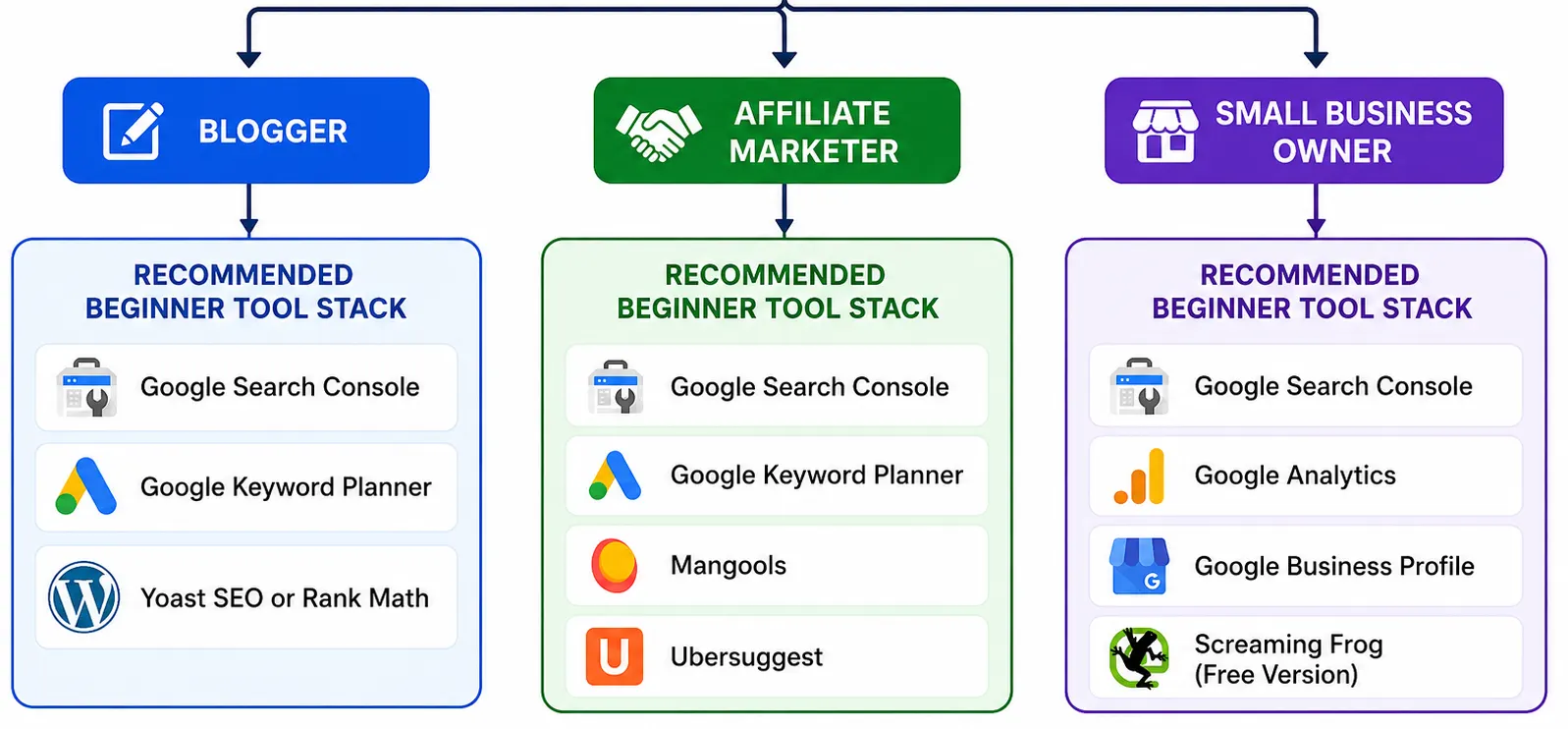
Different people need different tools. Here is a quick guide based on who you are:
For Bloggers
Start with Google Search Console, Google Keyword Planner, and a WordPress SEO plugin (Yoast or Rank Math). These three cover keyword discovery, content optimization, and performance tracking — everything a blogger needs in the early stages.
For Affiliate Marketers
Affiliate marketing is competitive. You need solid keyword research tools to find low-competition terms, and backlink analysis tools to understand what it takes to outrank competitors. Start free with Google tools, then consider Mangools or Ubersuggest when you are ready for more data.
For Small Business Owners
Google Search Console and Google Analytics are non-negotiable. Add Google Business Profile (for local SEO) and a technical SEO audit using Screaming Frog’s free version. These give you a clear picture of how your website appears in local and organic search.
For WordPress Website Owners
Rank Math or Yoast SEO plugin handles on-page SEO directly inside WordPress. Pair it with Google Search Console and you have a clean setup that covers most beginner needs without spending a penny.
Frequently Asked Questions About SEO Tools
What are SEO tools and why do beginners need them?
SEO tools are software applications that help you improve your website’s visibility in search engines like Google and Bing. Beginners need them because they simplify complex tasks like keyword research, technical site audits, backlink analysis, and rank tracking — work that would take hours to do manually. Free tools like Google Search Console are the best starting point.
Can I do SEO without paid tools?
Yes. You can do solid SEO using only free tools. Google Search Console, Google Analytics, Google Keyword Planner, and Google Trends are all free and provide reliable data directly from Google. Many beginners grow their organic traffic significantly before ever paying for an SEO tool.
What is the difference between on-page SEO tools and technical SEO tools?
On-page SEO tools help you optimize individual pages — things like keyword placement, meta titles, meta descriptions, headings, and content readability. Technical SEO tools scan your entire website for structural issues like broken links, slow page speed, missing sitemaps, duplicate content, and crawl errors. Both types are important, but beginners typically benefit most from on-page tools first.
Which is the best free SEO tool for a complete beginner?
Google Search Console is the best free SEO tool for beginners. It shows you exactly which keywords bring visitors to your site, which pages Google has indexed, and any technical errors that need fixing. The data comes directly from Google, so it is highly accurate and completely free to use.
Are AI SEO tools worth it for beginners?
AI SEO tools can save beginners a lot of time, especially for content planning and optimization. However, it is better to understand the basics of SEO first before relying on AI suggestions. Start with free tools, get comfortable with the fundamentals, and then explore AI tools like Surfer SEO when you are ready to scale your content production.
You Do Not Need to Master Everything at Once
SEO can feel overwhelming when you first look at all the tools and terminology. But the truth is, most successful beginners start with just two or three free tools and build from there.
Here is the simple path forward:
- Set up Google Search Console and Google Analytics today (both free, both essential)
- Install Yoast SEO or Rank Math if you are on WordPress
- Use Google Keyword Planner to find keyword ideas for your next article
- Publish consistently and check Search Console monthly to track your progress
- Upgrade to a paid tool only when your current setup cannot keep up with your growth
What are SEO tools at their core? They are your shortcut to smarter decisions. They replace guesswork with data and save you from wasting months on strategies that are not working.
The best time to set them up was when you launched your website. The second-best time is right now.
Ready to Take the Next Step?
Explore RexoHub’s in-depth reviews and comparisons of the best SEO tools for beginners. Whether you are looking for a free keyword research tool or an affordable all-in-one SEO platform, we help you find the right fit without the confusion.
