
You are ready to launch a website. You have narrowed your hosting choices down to two. Both seem affordable. Both promise fast speeds and easy WordPress setup. But you cannot figure out which one is actually better for your situation.
This Hostinger vs Bluehost comparison gives you a straight answer. We compare both hosts across every factor that matters for a beginner: price, speed, ease of use, WordPress support, and customer support. Every data point is sourced from independent tests or official websites.
The short answer: Hostinger is the better pick for most beginners. Bluehost is the better pick for a specific type of beginner. This guide explains exactly who falls into each category.
Hostinger and Bluehost: What Are They?
Hostinger
Hostinger is a web hosting company founded in Lithuania in 2004. It serves over 29 million customers across 150 countries. It runs on LiteSpeed web servers with a custom control panel called hPanel. Hostinger is known for competitive introductory pricing, a beginner-friendly dashboard, and global data center coverage including locations in Asia, South America, and the Middle East.
In 2026, Hostinger added an AI assistant called Kodee that can execute over 350 hosting tasks through a chat interface, plus an AI website builder called Horizons. These tools help beginners complete setup tasks without needing to understand the technical side.
Bluehost
Bluehost has been around since 2003 and is one of only three web hosts officially recommended by WordPress.org, a status it has held since 2006. It runs on cPanel, the industry-standard control panel used by millions of hosting tutorials worldwide. In 2024, Bluehost migrated its entire infrastructure to Oracle Cloud Infrastructure to improve speed and reliability.
Bluehost is known for its guided WordPress onboarding, 24/7 phone support, and Cloudflare CDN included on all plans. It serves over 5 million websites and targets beginners who want the safety of a well-known, officially endorsed host.
Hostinger vs Bluehost: Full Feature Comparison
📌 Pricing note: All prices are promotional first-term rates. Both hosts increase pricing significantly at renewal. Verify current prices at hostinger.com and bluehost.com before purchasing.
Feature | Hostinger Premium | Bluehost Starter |
Intro Price | From $2.99/mo (48-mo promo) | From $3.99/mo |
Renewal Price | ~$11.99/mo | ~$9.99/mo |
Websites | Up to 3 | Up to 10 |
Storage | 20 GB SSD (NVMe on Business+) | 10 GB NVMe |
Free Domain | 1 year | 1 year |
Free SSL | Lifetime | Lifetime |
Email Accounts | 2 per website (free 1 year) | Free for 1 month (Pro Email) |
Control Panel | hPanel (custom, clean) | cPanel (industry standard) |
Web Server | LiteSpeed | Apache (Oracle Cloud) |
Data Centers | 11 countries | Primarily US-based |
CDN | Free CDN (Business plan) | Cloudflare CDN (all plans) |
Backups | Weekly (daily on Business+) | Weekly (all plans) |
Phone Support | No | Yes, 24/7 |
Live Chat | 24/7 | 24/7 |
AI Tools | Kodee AI, Horizons builder | AI site creator tools |
WordPress Support | One-click, Optimised | WordPress.org recommended |
Money-Back | 30 days | 30 days |
Avg Load Speed | 0.6–0.8s (independent tests) | 0.35–1.5s (varies by test) |
Uptime | 99.9% guarantee (100% in tests) | 99.9% guarantee |
Pricing: Which Is Actually Cheaper?
First-Term Price
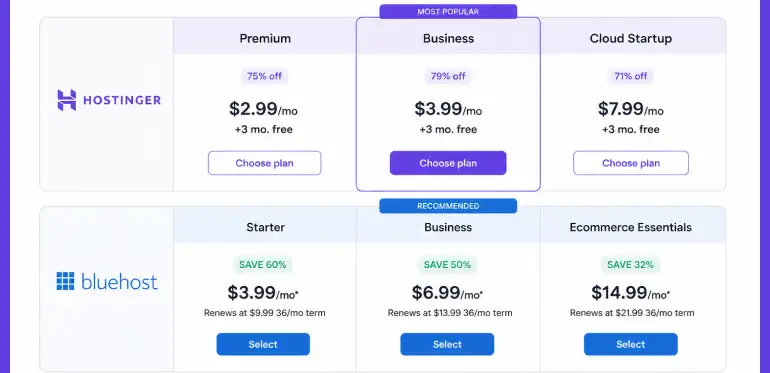
Hostinger wins on intro pricing. The Premium plan starts from $2.99/month on a 48-month term (per official hostinger.com). Bluehost Starter starts from $3.99/month (per official bluehost.com). That is about $1 per month difference, which adds up to around $36 over 3 years. Not huge, but worth knowing.
Hostinger’s 48-month promotional term is also longer than Bluehost’s maximum promotional period. If locking in a low rate for as long as possible matters to you, Hostinger has the edge.
Renewal Price
This is where it gets interesting. Hostinger (Premium) renew $11.99 and Bluehost (Starter) renew at $9.99/month. The Hostinger advantage is almost entirely in the promotional period.
One Catch With Bluehost
Bluehost deducts $15.99 from your refund if you cancel within the first year and used the free domain offer. This is stated in their terms of service. Hostinger does not have this domain clawback policy. It is a small but relevant detail for beginners who are still deciding.
Pricing: Hostinger wins. Lower intro price and longer promotional term. Renewal rates are quite high at the entry level.
Speed and Performance: What the Tests Actually Show
Speed affects two things directly: how your visitors experience your site, and how Google ranks you. Core Web Vitals, which include page load metrics, are now a confirmed Google ranking factor.
Server Technology
Hostinger uses LiteSpeed web servers on all shared hosting plans. LiteSpeed is significantly faster than Apache for WordPress sites, particularly when paired with LiteSpeed Cache. Hostinger also uses NVMe SSD storage on Business plans and above, which offers 3 to 5 times faster read/write speeds than standard SSDs.
Bluehost migrated to Oracle Cloud Infrastructure in 2024 and runs Apache web servers with NVMe SSD storage. Oracle Cloud provides strong reliability. However, Apache is generally slower than LiteSpeed for WordPress-heavy workloads, particularly under traffic spikes.
Independent Speed Test Results
Here is what independent testing shows in 2025 and 2026:
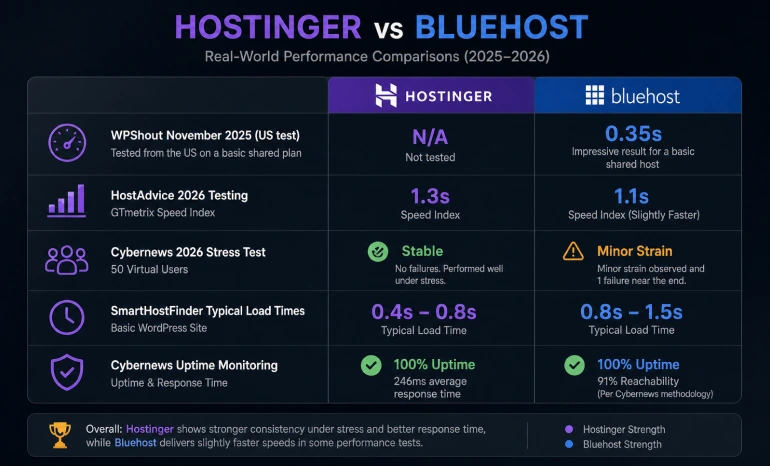
- WPShout November 2025 (US test): Bluehost 0.35s. This is an impressive result for a basic shared host and comes from Bluehost’s own comparison page.
- HostAdvice 2026 testing: Bluehost speed index 1.1s, Hostinger 1.3s in GTmetrix tests. Bluehost slightly faster here.
- Cybernews 2026 stress test (50 virtual users): Hostinger held stable with no failures. Bluehost showed minor strain and one failure near the end of the test.
- SmartHostFinder typical load times: Hostinger 0.4 to 0.8s. Bluehost 0.8 to 1.5s for a basic WordPress site.
- Cybernews uptime monitoring: Hostinger 100% uptime with 246ms average response time. Bluehost 100% uptime but 91% reachability in their specific test methodology.
The honest summary: both hosts perform well for basic sites. Bluehost can be faster in US-only test conditions. Hostinger handles traffic spikes more reliably and performs better at the global level, particularly for audiences outside the US.
💡 Real-world tip: Installing a caching plugin like LiteSpeed Cache on Hostinger or W3 Total Cache on Bluehost will significantly improve your load times on either host. Server technology matters but your WordPress configuration matters just as much.
Speed: Hostinger wins. Better under load and globally. Bluehost can be faster in clean US-only tests.
Ease of Use: Dashboards and Setup
Hostinger hPanel
Hostinger built its own control panel called hPanel. It is organised by website rather than by feature. When you log in, you see a list of your websites. You click into one and see all the tools for that specific site: file manager, database, email, WordPress tools, and more. The layout is clean.
Kodee, Hostinger’s AI assistant, can handle tasks like setting up email, migrating a site, running a health check, and optimising performance. You type what you want, and Kodee does it. For a complete beginner, this is a meaningful advantage.
The downside: hPanel is Hostinger-specific. If you have ever used a hosting tutorial that references cPanel, those steps will not directly apply to hPanel. You will need to find Hostinger-specific documentation.
Bluehost cPanel
Bluehost uses cPanel, the industry-standard control panel. This is the same interface used by dozens of popular web hosts. Tutorials on YouTube and hosting blogs almost always reference cPanel by default. If you search for help with hosting tasks online, most answers will show you cPanel screenshots that match what you see in Bluehost.
Bluehost also has a guided WordPress onboarding wizard. When you sign up and choose WordPress, the setup process walks you step by step through installing WordPress, choosing a theme, and configuring basic settings. For a true beginner who has never touched a hosting dashboard before, this guided flow is the most hand-holding of any host on this list.
Ease of Use: Bluehost wins. Guided WordPress onboarding and cPanel’s universal documentation give beginners more support resources.
WordPress Hosting: Which Is Better for WordPress Sites?
Both hosts support WordPress with one-click installation, automatic updates, and free SSL. Here is where they differ:
Bluehost and WordPress.org
Bluehost is one of three hosts officially recommended by WordPress.org, alongside DreamHost and SiteGround. This endorsement reflects Bluehost’s long compatibility track record with WordPress and its dedicated WordPress infrastructure. For a beginner who wants the safety of an officially vetted recommendation, this matters.
Bluehost’s plans are tuned for WordPress. The Starter plan includes weekly backups, malware scanning, a web application firewall, and AI site creation tools specifically designed for WordPress users.
Hostinger and WordPress
Hostinger installs WordPress in one click and uses LiteSpeed Cache to accelerate WordPress performance. LiteSpeed is specifically optimised for WordPress and can reduce server response times by up to 3 times compared to Apache. Hostinger also offers managed WordPress hosting on higher plans with staging environments for testing changes before they go live.
Hostinger does not have the WordPress.org endorsement. For most users, this is irrelevant in practice. LiteSpeed’s performance advantage is a real technical benefit. But if the endorsement carries weight in your decision, Bluehost is the choice.
WordPress: Bluehost wins. Official WordPress.org recommendation and guided onboarding. Hostinger wins on raw WordPress speed.
Customer Support: Who Actually Helps You When You Are Stuck?
Bluehost Support
Bluehost offers phone support, live chat, and email all available 24/7. Phone support is the key differentiator. If you have an urgent problem and prefer talking to a human, you can call Bluehost. This is a genuine advantage for non-technical beginners who get anxious about technical issues.
Response times from Bluehost’s live chat are generally fast. The quality of support varies, with some users reporting excellent help and others reporting basic scripted responses. Phone support receives stronger reviews than chat, particularly for complex issues.
Hostinger Support
Hostinger offers 24/7 live chat only. There is no phone line. For many beginners, this is fine. The Kodee AI assistant can handle many common tasks automatically. When you do need a human, the live chat response times average around 3 minutes according to Hostinger’s official documentation.
Hostinger’s support quality has improved significantly since 2023. The chat agents are generally helpful for common issues. For complex server-side problems, both Hostinger and Bluehost can be slow to escalate. Neither host is known for elite technical support compared to SiteGround or Cloudways.
Customer Support: Bluehost wins. Phone support is a genuine advantage for beginners who prefer talking to a person.
Security: What Each Host Includes by Default
Hostinger Security
- Free SSL certificate included on all plans
- Cloudflare-powered DDoS protection on the network level
- Automatic malware scanning available through the dashboard
- Two-factor authentication for the hPanel account
- Weekly automatic backups on the Premium plan. Daily on the Business plan and above
Bluehost Security
- Free SSL certificate included on all plans
- Cloudflare CDN included on all shared hosting plans (this also adds a layer of DDoS protection)
- Weekly automatic backups on all shared hosting plans
- Malware scanning and a web application firewall are included in Starter plan
- SiteLock security available as a paid add-on for enhanced protection
The backup difference matters. If you update your site daily, a weekly backup is not adequate protection. Hostinger includes daily backups from the Business plan upward. Bluehost doesn’t offer a daily backup plan. For a beginner who is actively building and updating content, Hostinger’s (Business Plan) daily backup coverage is a meaningful advantage at the entry level.
Security: Bluehost wins. Weekly backups on all plans and Cloudflare CDN are included across every tier.
The location of your hosting server affects how fast your site loads for your visitors. If your server is in the US and your visitors are in Southeast Asia, your site will load more slowly than if you had a server closer to them.
Hostinger: 11 Global Data Centers
Hostinger has 11 data center locations across Europe (France, Germany, Lithuania, Netherlands, UK), Asia (India, Indonesia, Malaysia, Singapore), and the Americas (three US locations and Brazil). When you set up your site, you choose which data center to use. This gives you real flexibility to host closer to your audience.
Bluehost: Primarily US-Based
Bluehost’s shared hosting infrastructure is primarily US-based. It uses Cloudflare’s global CDN on all plans, which helps distribute cached content globally. But the origin server is US-based. For sites targeting audiences in Asia, the Middle East, or South America, Hostinger’s regional server options give a real speed advantage.
Global Coverage: Hostinger wins. 11 data centers across 4 continents. Better for non-US audiences.
Who Should Choose Which? The Decision Matrix
Use this table to find your recommendation in seconds:
Your Situation | Hostinger | Bluehost |
I want the lowest first-year price | ✅ Pick this | |
I need phone support | ✅ Pick this | |
I want the best long-term value overall | ✅ Pick this | |
I want the official WordPress.org recommendation | ✅ Pick this | |
My audience is outside the US or Europe | ✅ Pick this | |
I want daily backups from day one | ✅ Pick this | |
I want the fastest LiteSpeed servers | ✅ Pick this | |
I prefer the familiar cPanel interface | ✅ Pick this | |
I want a Cloudflare CDN on all plans | ✅ Pick this | |
I want AI hosting tools built in | ✅ Pick this | |
I want to host multiple sites on entry plan | ✅ Pick this (up to 10) | |
I need more storage on the entry plan | ✅ Pick this (20 GB) |
The Honest Recommendation
Choose Hostinger If:
- You want the best overall value at entry level
- Your audience is partly or fully outside the US or Europe
- You are comfortable using live chat for support
- You need daily backups (Business Plan) from the very first day
- You want LiteSpeed speed advantages for your WordPress site
- You want to host up to 3 sites with 20 GB of storage for a low monthly rate
Choose Bluehost If:
- You want phone support and the reassurance of talking to someone
- You want the official WordPress.org endorsement
- You prefer cPanel because of its universal tutorial coverage
- You want Cloudflare CDN included from the entry plan
The bottom line: For most beginners building a blog, portfolio, or small business site in 2026, Hostinger provides more value. It is faster under load, has a more modern dashboard, offers better global coverage, and the intro price is lower. Bluehost earns its place for the specific beginner who wants phone support, or the credibility of a WordPress.org recommended host.
🏆 Final verdict: Hostinger for value, speed, and global reach. Bluehost for phone support, weekly backups on entry plans, and the WordPress.org recommendation. Pick based on which of those factors matters most to you.
🔗 Want deeper reviews? Read our full in-depth Hostinger review on RexoHub for independent speed test results, hPanel walkthrough, and a complete plan breakdown before you decide.
Frequently Asked Questions
Q: Is Hostinger really faster than Bluehost?
In most independent tests, Hostinger performs better under load and at a global level. This is mainly due to LiteSpeed servers and NVMe SSD storage. Bluehost has shown better raw speed in some US-specific tests (WPShout measured 0.35s in November 2025). For sites serving a US-only audience, Bluehost can be comparable or faster. For sites serving an international audience, Hostinger’s 11 global data centers and LiteSpeed advantage give it the edge.
Q: Does Hostinger include daily backups on all plans?
No. Hostinger only includes daily backups from the Business plan upward. The Premium entry plan includes weekly backups only. If daily backups matter to you from day one, choose the Hostinger Business Plan.
Q: Which is better for a complete beginner with no technical experience?
Both work well for beginners. Bluehost has a guided WordPress onboarding wizard that walks you through every setup step, phone support you can call when stuck, and a familiar cPanel interface backed by thousands of tutorials. Hostinger has Kodee AI that can complete tasks for you, a clean hPanel dashboard, and live chat support. If you want phone support and guided WordPress setup, choose Bluehost. If you are comfortable with live chat and want the best value, choose Hostinger.
Q: Do both Hostinger and Bluehost increase their prices at renewal?
Yes. Both hosts use promotional introductory pricing that increases at renewal. Hostinger Premium renews at approximately $11.99 per month. Bluehost Basic also renews at approximately $9.99 per month at the entry level. The main difference is in the first term: Hostinger’s intro price is lower and the 48-month promotional period is longer. Always factor in the renewal rate when calculating your total cost.
Q: Can I migrate my existing site from one host to the other?
Yes. Both Hostinger and Bluehost offer free website migration services. Hostinger’s support team handles the migration for you. Bluehost also offers free migration for most hosting plans. Contact the support team of whichever host you choose before you sign up to confirm the details of their migration service.
Conclusion: Hostinger vs Bluehost
In this Hostinger vs Bluehost comparison, Hostinger is the better overall pick for most beginners. It is faster under load, more affordable at intro pricing, has better global data center coverage, and provides a clean dashboard with AI tools that help complete beginners set up quickly.
Bluehost earns its recommendation for a specific type of beginner: one who wants phone support, weekly backups from the entry plan, the Cloudflare CDN on all tiers, and the credibility of a WordPress.org-endorsed host.
Both are reliable hosts for a first website. The right choice comes down to which specific advantages matter most for your situation. Use the decision matrix above to find your answer quickly.
Whichever you choose, take advantage of the 30-day money-back guarantee. Build your site, test the performance and support, and evaluate before the window closes.
→ Try Hostinger | 30-Day Money-Back Guarantee
Try Bluehost | 30-Day Money-Back Guarantee
Looking for more options? Read our guide on How to Choose the Best Web Hosting for Beginners, or want to build your website with a website builder? Check our guide about Best Website Builders for Beginners in 2026.
