

Short Answer
For a brand new website with little traffic, shared hosting is the smarter starting point. It costs less, requires no technical knowledge, and handles early-stage growth well. Cloud hosting becomes the better choice when your site grows, starts generating revenue, or needs reliable performance during traffic spikes. Most beginners do not need cloud hosting on day one.
You are about to launch your website. You have picked a domain name, maybe even chosen a platform like WordPress. Then the hosting page hits you with options: shared hosting, cloud hosting, VPS, dedicated servers.
Most beginner guides either push you toward the cheapest option without explaining the trade-offs, or scare you into buying more than you need. This guide does neither.
The shared hosting vs cloud hosting debate is genuinely worth understanding before you spend money. The right choice depends on where your site is right now and where you want it to go. Let us walk through both options clearly.
What Is Shared Hosting? (And Why It Is So Popular)
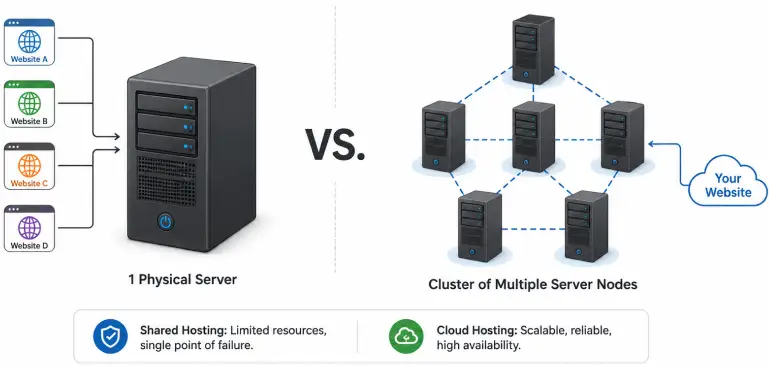
Shared hosting is exactly what the name says. Your website lives on a server alongside many other websites, sometimes hundreds or even thousands of them. You all share the same physical resources: CPU power, RAM, and storage.
Think of it like renting a desk in a co-working space. Everyone in the building uses the same Wi-Fi, the same coffee machine, and the same meeting rooms. It works perfectly well when the building is not too full. But during peak hours, things can slow down.
Why do so many beginners start here? Because it is affordable and easy. You do not need to manage a server. The hosting company handles all the technical maintenance, software updates, and security patches. You just log in to a control panel, install WordPress with one click, and start building.
Shared Hosting at a Glance | Details |
How it works | Multiple websites share one physical server |
Who manages the server | The hosting provider handles everything |
Typical starting cost | Roughly $2 to $10 per month (check provider sites for current pricing) |
Technical knowledge needed | Very little — beginner friendly |
Best suited for | New websites, blogs, small business sites, low-traffic projects |
Main limitation | Shared resources can cause slowdowns during neighbor traffic spikes |
The Noisy Neighbor Problem
On a shared server, all websites draw from the same resource pool. If a neighboring website suddenly receives a flood of visitors, it can use up a large chunk of the CPU and RAM, leaving less for everyone else — including your site. This is called the noisy neighbor problem. On a quality shared host, this is managed and rare. On a cheap, overcrowded server, it can happen regularly.
What Is Cloud Hosting? (Explained Simply)
Cloud hosting spreads your website across a network of interconnected servers rather than keeping it on one physical machine. If one server in that network has a problem, your site automatically moves to another. There is no single point of failure.
The resources available to your site are also flexible. If your website gets a sudden surge of traffic, cloud hosting can pull in more resources from the network to handle the load. When traffic drops back down, those resources are released.
Big names like Amazon Web Services (AWS), Google Cloud, and Microsoft Azure are the backbone of cloud hosting infrastructure. Many managed hosting companies like Kinsta and WP Engine run their infrastructure on top of these platforms, giving you cloud-level performance without needing to manage a server yourself.
Cloud Hosting at a Glance | Details |
How it works | Website runs across multiple connected servers |
Who manages the server | You (self-managed) or the provider (managed cloud) |
Typical starting cost | Roughly $10 to $35+ per month for managed options |
Technical knowledge needed | Low for managed cloud, higher for self-managed |
Best suited for | Growing websites, e-commerce, revenue-generating sites |
Main advantage | Scalability, uptime reliability, consistent performance |
Shared Hosting vs Cloud Hosting: A Direct Comparison
Now let us put both options side by side across the factors that actually matter when you are choosing hosting for a new website.
Speed and Performance
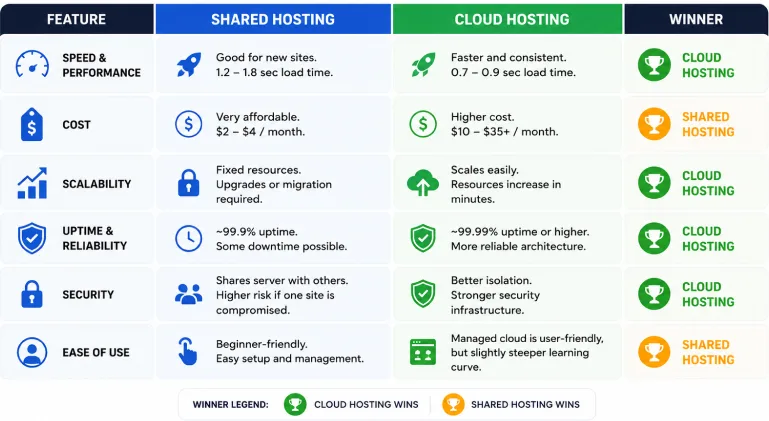
For a low-traffic new website, quality shared hosting delivers perfectly acceptable speed. Independent testing has shown that a standard WordPress blog on a reputable shared host loads in around 1.2 to 1.8 seconds under normal conditions. That is within Google’s acceptable range for Core Web Vitals.
Cloud hosting is faster and more consistent. The same site on a managed cloud host typically loads in 0.7 to 0.9 seconds. The gap is meaningful, but not critical for a brand new site with few visitors.
Where the gap becomes very important is under load. When a shared hosting site faces a sudden spike of even 500 simultaneous visitors, load times can jump to 4 to 6 seconds or worse. A cloud-hosted site typically stays below 1.5 seconds under the same conditions.
Winner: Cloud hosting — but shared hosting is fine for new, low-traffic sites.
Cost
Shared hosting is the most affordable hosting type available. Entry plans start as low as $2 to $4 per month because the infrastructure cost is spread across many customers. This makes it an easy starting point for anyone launching their first website on a tight budget.
Cloud hosting costs more. Managed cloud options like Kinsta or WP Engine typically start at $20 to $35 per month. Entry-level cloud VPS plans from providers like Cloudways or DigitalOcean start at around $10 to $15 per month and offer significantly better performance and resource isolation than shared hosting.
One important thing most comparison articles skip: the cost gap is smaller than it looks at some providers. There are hosting companies where a cloud VPS plan costs only a few dollars more per month than a shared plan, yet delivers dedicated CPU and RAM. Always check the current pricing on the provider’s official website before making a decision.
Winner: Shared hosting on raw price. Cloud hosting on value per dollar as your site grows.
Scalability
Shared hosting has fixed resource limits. When your site grows beyond what your plan allows, you have two options: upgrade to a higher shared plan, or migrate to a different hosting type. Both take time and sometimes cause brief disruption.
Cloud hosting scales dynamically. Most cloud platforms let you increase your resources (RAM, CPU, storage) in minutes without downtime. Some plans do this automatically. For a site that is growing or expects unpredictable traffic, this flexibility is a major practical advantage.
Winner: Cloud hosting, clearly.
Uptime and Reliability
Quality shared hosting providers typically advertise 99.9% uptime, which translates to roughly 8 hours of downtime per year. Budget shared hosts with overcrowded servers can be considerably worse.
Cloud hosting is architecturally more reliable because there is no single point of failure. If one server in the network goes down, your site moves to another automatically. Many managed cloud hosts advertise 99.99% uptime or higher.
For a personal blog or a portfolio site, 99.9% uptime is acceptable. For an online store or any website where downtime directly costs you money, the cloud hosting uptime advantage is worth paying for.
Winner: Cloud hosting — the architecture is fundamentally more resilient.
Security
Both hosting types can be secure when set up properly. The key difference is isolation. On shared hosting, your website shares an environment with many others. If one site on the server gets compromised by malware, there is a risk it could affect other accounts on the same server. Good hosts mitigate this with account isolation, but the risk exists.
Cloud hosting environments are better isolated. Each virtual server operates independently with its own resources and firewall rules. This makes it harder for one compromised site to affect another.
Both types should include a free SSL certificate from a reputable provider. If a hosting plan does not include free SSL, look elsewhere.
Winner: Cloud hosting — better isolation and security infrastructure.
Ease of Use
Shared hosting wins here for beginners. Everything is managed for you. Control panels like cPanel or hPanel handle all the server-side work. Installing WordPress takes one click. You do not need to know what a server is to get started.
Managed cloud hosting is close behind in terms of usability. Platforms like Kinsta and WP Engine have clean dashboards designed for non-technical users. The setup is still simple, but there is a slightly steeper learning curve than basic shared hosting.
Self-managed cloud hosting (your own VM on AWS or Google Cloud) is a different story. That requires technical knowledge and is not suitable for beginners without developer experience.
Winner: Shared hosting — easiest starting point for beginners by a clear margin.
Quick Comparison Table: Shared Hosting vs Cloud Hosting
Category | Shared Hosting | Cloud Hosting |
Speed (low traffic) | Good (1.2–1.8s) | Better (0.7–0.9s) |
Speed (traffic spike) | Can degrade significantly | Stays consistent |
Starting cost | Very low ($2–$10/mo) | Higher ($10–$35+/mo) |
Scalability | Fixed limits, manual upgrade | Scales dynamically |
Uptime | ~99.9% | 99.9% to 99.99%+ |
Security isolation | Shared environment | Better isolated |
Ease of use | Beginner-friendly | Easy (managed), harder (self-managed) |
Best for | New sites, blogs, small biz | Growing sites, e-commerce, revenue sites |
SEO impact | Fine for new sites | Better under high-traffic load |
Who Should Choose Shared Hosting?
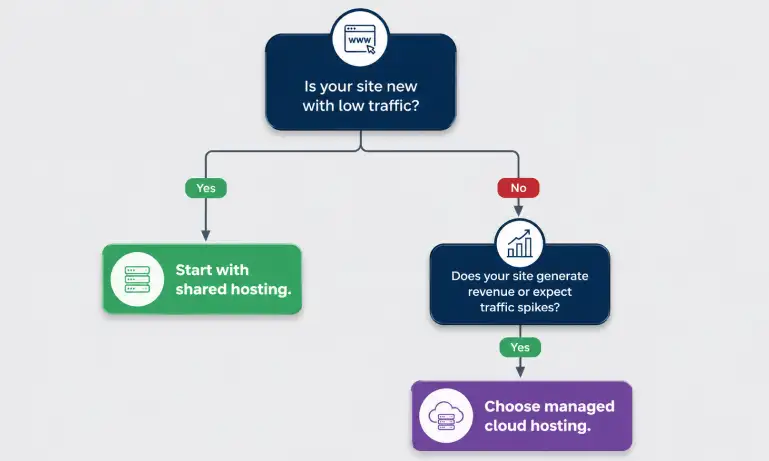
Shared hosting is the right starting point for you if:
- You are launching your first website and still learning how everything works
- Your site is a personal blog, portfolio, or informational website
- You expect fewer than 25,000 monthly visitors in the first year
- Budget is a real constraint and you want to start lean
- Your website does not generate direct revenue where downtime would cost you money
Starting on shared hosting is not a mistake. It is often the smart, practical choice. Many successful websites started on shared hosting and scaled up as they grew. The key is choosing a quality provider, not just the cheapest option you can find.
Recommended Shared Hosting Providers to Consider
SiteGround — known for strong performance and excellent support on shared plans. Hostinger — very competitive pricing with solid speed benchmarks. Both include free SSL and one-click WordPress installation. Always verify current pricing and features directly on the provider’s official website before signing up.
Who Should Choose Cloud Hosting?
Cloud hosting makes more sense if:
- Your website generates revenue and downtime directly costs you money
- You expect or already receive more than 25,000 to 50,000 monthly visitors
- You run an online store, a membership site, or any platform with user accounts
- Your site needs to handle traffic spikes (product launches, viral content, seasonal events)
- You want better peace of mind on uptime and performance without managing servers yourself
If you fall into this category, the best option for most beginners is managed cloud hosting — not a raw cloud server on AWS or Google Cloud. Managed cloud hosts give you cloud infrastructure with a simple dashboard, so you do not need to be a developer.
Recommended Managed Cloud Hosting Providers to Consider
Kinsta — runs on Google Cloud, excellent performance and dashboard, good for WordPress. WP Engine — WordPress-focused managed cloud with strong security. Cloudways — lets you choose your underlying cloud provider (DigitalOcean, AWS, Google Cloud) with a simplified management layer. Always check current pricing on each provider’s official website.
When Should You Upgrade From Shared to Cloud Hosting?
Starting on shared hosting and upgrading later is a perfectly valid strategy. Most good shared hosting providers offer free migrations or at least easy migration paths. Here are the signals that tell you it is time to move:
- Your site consistently loads in more than 3 seconds — and you have already optimised images and enabled caching
- Your monthly visitor count is regularly exceeding 25,000 to 50,000
- You are running an online store and downtime or slow checkout pages are losing you sales
- Your site has been mentioned in a large newsletter, podcast, or news article and you expect traffic spikes
- Your hosting provider’s dashboard shows you regularly hitting resource limits on your plan
If you see two or more of these signs consistently, it is time to evaluate a cloud or managed WordPress hosting plan. The migration process with most managed cloud hosts is handled for you for free within 24 to 48 hours.
What Most Comparison Articles Get Wrong About This Topic
Most shared hosting vs cloud hosting articles push you toward one type without considering your actual situation. Here are a few things worth knowing that those guides tend to skip:
Not All Cloud Hosting Is the Same
The word ‘cloud’ is used loosely in the hosting industry. Some entry-level plans labelled as ‘cloud hosting’ are essentially shared hosting with a marketing rebrand. True cloud hosting distributes your site across multiple physical servers with dynamic resource allocation. If a ‘cloud plan’ does not specify dedicated CPU cores and RAM allocation, ask the provider directly what the infrastructure actually looks like.
Cheap Shared Hosting and Good Shared Hosting Are Very Different
A $1 per month shared plan from an unknown provider is not the same as a $5 per month plan from SiteGround or a quality regional provider. Overcrowded cheap servers have far more noisy neighbor problems, worse security, and slower support. If you are going to use shared hosting, choose a provider with a solid reputation for server quality, not just the cheapest price on a comparison site.
Shared Hosting Is Not Bad — It Is Just for a Different Stage
A lot of content online makes shared hosting sound outdated or risky. For a new website with modest traffic expectations, that framing is misleading. Shared hosting is a mature, well-understood technology. The right approach is to match your hosting type to your current needs and upgrade when your site’s growth demands it.
SEO Impact Is Real But Not Extreme for New Sites
Google does factor in page speed and Core Web Vitals as ranking signals. But both good shared hosting and managed cloud hosting can meet those thresholds for a low-traffic site. The SEO difference between hosting types only becomes meaningfully significant when your site grows and starts handling more concurrent visitors.
Frequently Asked Questions
Is shared hosting good enough for a new website?
Yes. For a brand new website with little to no traffic, shared hosting is more than good enough. It is affordable, beginner-friendly, and easy to manage. Most quality shared hosting providers can handle your first year of growth comfortably without any performance issues.
When should I switch from shared hosting to cloud hosting?
The main signals to watch for are: your site consistently takes more than 3 seconds to load, you are receiving more than 25,000 to 50,000 monthly visitors, your site generates revenue where downtime directly costs you money, or you are experiencing frequent traffic spikes. At that point, a managed cloud hosting plan or cloud VPS is worth the upgrade.
What is the noisy neighbor problem in shared hosting?
On a shared server, all websites use the same pool of resources like CPU and RAM. If one website on your server receives a sudden traffic spike and uses up a large share of those resources, other sites on the same server can slow down temporarily. This is called the noisy neighbor problem, and it is a known limitation of shared hosting infrastructure.
Is cloud hosting harder to manage than shared hosting?
It depends on the type of cloud hosting. Raw cloud hosting on platforms like AWS or Google Cloud requires technical knowledge to set up and manage. But managed cloud hosting platforms like Kinsta, WP Engine, or Cloudways handle the technical side for you, making them almost as easy as shared hosting to use day-to-day.
Does hosting type affect my website’s SEO?
Yes, indirectly. Google uses page speed and Core Web Vitals as ranking signals. Slow hosting can result in longer load times, which can hurt your rankings. Both good quality shared hosting and cloud hosting can meet Google’s Core Web Vitals thresholds for a low-traffic site. The difference becomes more significant when your site grows and traffic increases.
Shared Hosting vs Cloud Hosting: The Bottom Line
If you are launching a new website, start with quality shared hosting. It is affordable, simple, and more than capable for the early stage of building an audience or running a small business online. There is no need to pay three times more for cloud infrastructure before you have the traffic to justify it.
If your website is already getting consistent traffic, generates revenue, or you expect significant growth in the next six months, move to a managed cloud hosting plan. The performance and reliability improvements are worth the extra cost at that stage.
The shared hosting vs cloud hosting decision is not permanent. It is a starting point. Start lean, watch your metrics in Google Search Console and your hosting dashboard, and upgrade when your site’s growth tells you it is time.
The worst decision is spending months stuck in analysis paralysis while your site sits unpublished. Pick the right option for where you are now, and move forward.
Browse RexoHub’s hosting guides to know more about hosting. Check How to Choose the Best Web Hosting for Beginners. Also you can read our details guide about 7 Best Cheap Hosting Plans for Beginners.
