

The Simple Answer
AI tools are software applications that use artificial intelligence to handle tasks that would normally take significant human time and effort — things like writing, answering questions, creating images, summarizing long documents, and building code. You type what you need, and the tool does the work. No technical background required.
You have probably heard people talking about AI tools constantly over the past year or two. Your inbox has articles about them. Your competitors might already be using them. And you are sitting there wondering: what are AI tools, exactly, and do I actually need them?
That is a fair question, and it deserves a straight answer rather than a buzzword-filled sales pitch.
This guide explains AI tools in plain language. No pressure to buy anything. Just a clear look at what these tools are, how they work, the different types available, and how a beginner or small business owner can actually start using them today.
What Are AI Tools and How Do They Work?
AI tools are software programs powered by artificial intelligence, which is a branch of computer science focused on building systems that can learn from data and make decisions.
You do not need to understand the science behind it to use the tools. The practical version is this: these tools have been trained on enormous amounts of text, images, audio, and data. From that training, they learned to recognize patterns. Now, when you give them a task, they use those patterns to produce an output.
Think of it like a very well-read assistant who has consumed millions of books, articles, manuals, and conversations. When you ask them to write an email, summarise a report, or suggest a design, they draw on everything they have absorbed to give you something useful.
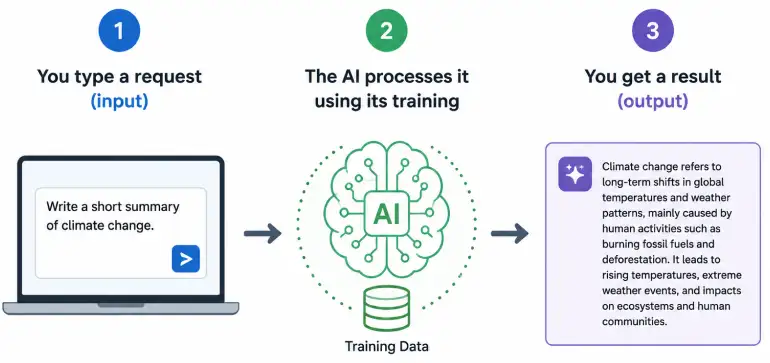
The Basics: What Happens When You Use an AI Tool
Most AI tools you encounter as a beginner work through a simple interface: a text box. You type a request, called a prompt, and the tool responds. This is called a prompt-and-response model, and it is the foundation of most AI writing tools, chatbots, and research assistants available today.
Behind the scenes, these tools run on large language models (LLMs) or similar AI architectures. The leading models powering these tools include OpenAI’s GPT family (behind ChatGPT), Google’s Gemini, and Anthropic’s Claude. Each has its own strengths, but for a beginner, the practical experience of using them is very similar: you ask, they respond.
Image generation tools work slightly differently. They are trained on image-text pairs, so when you describe a picture in words, they generate a visual that matches your description. Tools like Midjourney and Adobe Firefly use this approach.
Key Concept: Large Language Model (LLM)
A Large Language Model is the AI engine behind most text-based AI tools. It has been trained on vast amounts of written content and learned to predict and generate useful, coherent text based on your input. When you use ChatGPT or Claude, you are interacting with an LLM. You do not need to know how it works — just that the more clearly you describe what you need, the better results you get.
Why Are AI Tools Suddenly Everywhere?
AI technology has existed in various forms for decades, but the tools available to ordinary people changed dramatically starting around 2022 and have continued to develop rapidly since. The shift happened because the underlying models became good enough at generating useful, human-like outputs that they became practical for everyday work.
For small businesses, the practical consequence is significant. Tasks that used to require hiring a specialist, writing product descriptions, editing photos, creating social media content, summarising research, can now be done faster using AI tools, often at low or no cost.
This does not mean AI tools are perfect, or that they replace human judgment. They make mistakes, produce generic outputs when given vague instructions, and should always be reviewed before publishing. But for repetitive, time-consuming tasks, they genuinely save hours of work each week.
A 2024 survey by McKinsey found that over 65% of organizations were using AI tools in some function of their business, up from around 33% in 2023. For small business owners, this is not a trend to ignore.
The Main Types of AI Tools (Explained Simply)
There are now thousands of AI tools available. The easiest way to understand them is by grouping them into categories based on what they do. Here are the types that matter most for beginners and small business owners.
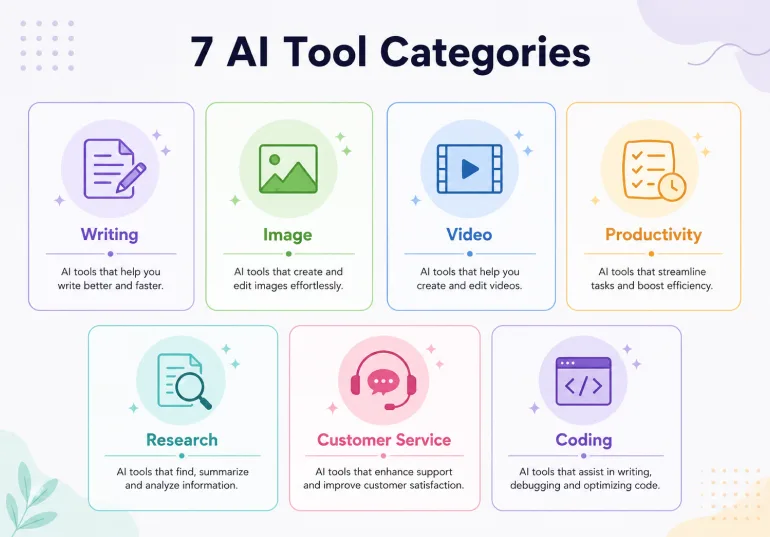
1. AI Writing and Content Tools
Examples: ChatGPT, Claude, Gemini, JasperThese tools help you write. Give them a topic, a brief, or even just a rough idea, and they produce drafts of blog posts, emails, product descriptions, social media captions, and more. They are not replacing writers, but they significantly reduce the time it takes to get from blank page to first draft. For a small business owner writing a weekly newsletter or updating a website, these are the most immediately useful AI tools to start with.
2. AI Image Generation Tools
Examples: Midjourney, Adobe Firefly, Canva AIThese tools create images from text descriptions. You describe what you want to see in plain language, and the tool generates a visual. They are useful for creating social media graphics, website hero images, product mockups, and marketing materials without needing a designer or stock photo subscription. Canva’s AI image features are particularly beginner-friendly because they sit inside the Canva design tool you may already use.
3. AI Research and Knowledge Tools
Examples: Perplexity AI, Google NotebookLM, ChatGPTThese tools help you find information faster and make sense of large documents. Perplexity AI works like a search engine that gives you direct answers with cited sources instead of a list of links. Google NotebookLM lets you upload your own documents and then ask questions about them — useful for analysing contracts, research papers, or long reports. For a small business owner doing competitive research or trying to understand an industry topic quickly, these save significant time.
4. AI Productivity and Meeting Tools
Examples: Fathom, Granola, Notion AI, Evernote AIThese tools handle the administrative overhead of working: transcribing meetings, summarising long threads, organising notes, and turning rough ideas into structured documents. Fathom and Granola are popular meeting transcription tools — they listen to your calls and produce accurate summaries with action items automatically. For anyone running multiple client calls or team meetings each week, these tools save hours of note-taking.
5. AI Video and Audio Tools
Examples: Synthesia, ElevenLabs, DescriptThese tools create or edit video and audio content using AI. Synthesia lets you create business explainer videos with AI-generated presenters from a text script — no camera, no recording setup. ElevenLabs generates realistic voice audio from text, useful for podcasts, video voiceovers, and accessibility features. Descript lets you edit video by editing the transcript, which is far more intuitive than traditional video editing software.
6. AI Design Tools
Examples: Canva AI, Adobe Firefly, Figma AIThese tools add AI capabilities to the design process. Canva’s AI features can remove image backgrounds, generate new images, resize designs for different formats, and suggest layouts — all inside the familiar Canva interface. Adobe Firefly is integrated into Adobe’s creative apps and is designed specifically for commercial use, meaning the images it generates are cleared for use in professional work.
7. AI Customer Service Tools
Examples: Intercom AI, Tidio, Zendesk AIThese tools power chatbots and automated responses on business websites. They can answer common customer questions 24 hours a day, collect lead information, and escalate complex queries to a human team member. For small businesses that cannot staff a customer service team around the clock, AI-powered chat tools provide a practical middle ground.
Free vs Paid AI Tools: What Do You Actually Get?
One of the most common questions from beginners is whether you need to pay for AI tools to get real value. The honest answer is that you can accomplish a lot with free tiers before you ever need to spend money.
Free AI Tools (Good Starting Point) | Paid AI Tools (Worth It When You Scale) |
ChatGPT free tier — solid general writing and research | ChatGPT Plus — faster, more capable model, image generation |
Google Gemini free — integrated with Google Workspace | Claude Pro — longer documents, priority access |
Canva free — AI features included | Canva Pro — more AI credits and premium templates |
Google NotebookLM — completely free | Jasper — built for high-volume content teams |
Perplexity AI free — 5 AI searches per day | Perplexity Pro — unlimited searches, upload files |
Fathom meeting recorder — free for core features | Fathom paid — team features and CRM integration |
Beginner Recommendation
Start with the free tiers. Set up ChatGPT (free), Google Gemini (free), and Canva (free with AI features). Use them consistently for 30 days on real tasks. After that, you will have a much clearer picture of which tool saves you the most time — and that is the one worth paying for.
How AI Tools Actually Work: The Non-Technical Version
You do not need to understand machine learning to use AI tools effectively. But a basic grasp of how they learn helps you use them better.
Training on Data
AI tools learn by processing enormous amounts of existing content. A text-based AI tool like ChatGPT was trained on a massive collection of text from books, websites, research papers, and other sources. From this data, it learned the patterns of language: how sentences are structured, how topics relate to each other, and what a useful response to a given question looks like.
This training happened before you ever opened the app. When you type a request, the tool is not searching the internet for an answer in real time (unless it has a specific web search feature). It is drawing on what it learned during training to generate a response that fits your request.
Why AI Tools Get Things Wrong
AI tools can produce confident-sounding incorrect information. This happens for several reasons. The training data had a cutoff date, so the tool does not know about recent events unless it has web access. The tool can also fill gaps in its knowledge with plausible-sounding but inaccurate details, a problem sometimes called hallucination.
This is why every output from an AI tool should be reviewed before you use it professionally. Treat AI output the same way you would treat a first draft from a capable but junior colleague: useful as a starting point, but requiring your own judgment and verification for anything factual.
The Quality of Your Input Matters
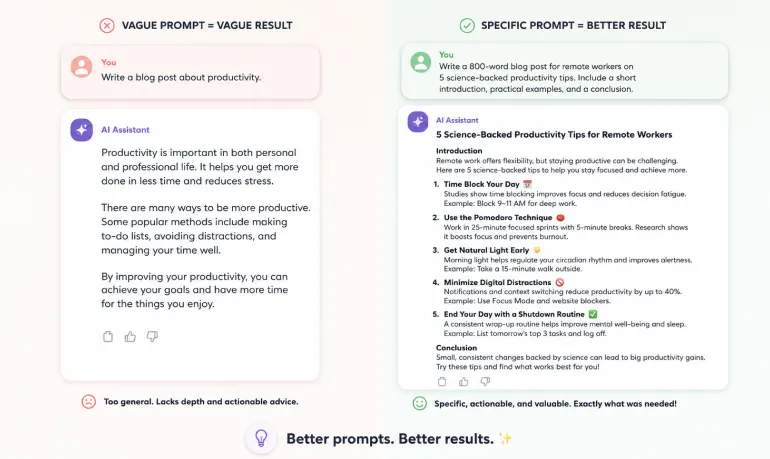
One insight that surprises most beginners: the quality of what you put into an AI tool directly affects what you get out. A vague request produces a generic output. A specific, detailed request with context produces something much more useful.
Vague: “Write me a blog post about productivity.”
Better: “Write a 600-word blog post for small business owners about three simple ways to reduce email time each day. Friendly tone, practical tips, no jargon.”
The second request gives the tool everything it needs to produce something useful on the first try. Learning to write better prompts is the single most valuable skill for a beginner working with AI tools.
Real-World Uses for Small Business Owners Right Now
Enough theory. Here is where AI tools for everyday use actually make a difference for someone running a small business or building an online presence:
Content and Marketing
- Write first drafts of blog posts, email newsletters, and social media captions
- Generate product descriptions for an online store
- Repurpose a long article into a LinkedIn post or a short video script
- Create images for your website and social profiles without a designer
Customer Communication
- Draft professional responses to customer enquiries faster
- Create FAQ content for your website based on real questions you receive
- Set up a basic chatbot on your website to handle common questions after hours
Research and Planning
- Summarise long reports, contracts, or competitor websites quickly
- Research a new market or topic and get a structured overview
- Generate ideas for content, products, or campaign angles
Admin and Organisation
- Transcribe and summarise your client calls automatically
- Turn rough meeting notes into clean action item lists
- Draft project briefs, proposals, and standard operating procedures faster
A Practical Starting Point
Pick one task you do every week that takes more time than it should. Draft it with an AI writing tool instead of starting from scratch. Review and edit the output. After a few tries, you will have a clear sense of where AI tools genuinely save you time — and that is where to focus.
Three Things Beginners Should Know Before They Start
1. AI Tools Are Not Always Right
This cannot be said enough. AI tools are impressive, but they make mistakes — especially with specific facts, numbers, dates, and niche topics. Always fact-check any statistic or factual claim an AI tool produces before you publish or share it. Think of the output as a useful draft, not a finished product.
2. Be Thoughtful About What Data You Share
Most consumer AI tools process your inputs on external servers. For general tasks — writing a blog post, brainstorming ideas, summarising a public article — this is not a concern. But avoid putting sensitive customer data, financial records, confidential contract terms, or personal identification information into AI tools unless you have confirmed the provider’s data handling policies meet your privacy requirements.
3. The Tool That Everyone Talks About May Not Be the Best One for You
ChatGPT gets most of the attention, and it is genuinely excellent. But Google Gemini integrates better with Google Workspace tools if that is your environment. Claude is particularly good with long documents and nuanced writing tasks. Perplexity is better for research with cited sources. Try two or three before deciding where to spend your time or money.
Frequently Asked Questions About AI Tools
What are AI tools, exactly?
AI tools are software applications that use artificial intelligence to complete tasks that would normally require human effort: writing, answering questions, editing images, summarising documents, and generating code. They learn from large amounts of data to understand patterns and produce useful outputs. You do not need any technical background to use most of them.
Are AI tools safe to use for a small business?
Generally yes, but with reasonable caution. Avoid putting sensitive customer data, passwords, or confidential financial information into AI tools that process data on external servers. For general tasks like drafting content, summarising notes, and creating visuals, the main established tools are safe and practical to use.
Do I need technical skills to use AI tools?
No. Most AI tools designed for everyday use work through a simple text box: you type what you need, and the tool responds. No coding, no complex setup beyond creating an account. ChatGPT, Gemini, and Claude all work the same way you would send a message to a colleague.
Are there free AI tools for beginners?
Yes. Many capable AI tools have a free tier. ChatGPT, Google Gemini, Claude, Canva’s AI features, and Google NotebookLM all offer free access with some usage limits. For most beginners and small business owners, the free tiers are more than enough to start with and get genuine value from before considering a paid plan.
Can AI tools replace employees?
AI tools work best as assistants rather than replacements. They handle repetitive, time-consuming tasks — drafting, summarising, researching, formatting — faster than a person can. But they still need human direction, judgment, and review. For small businesses, AI tools are most useful as a way to get more done with the team you have, not as a substitute for human thinking.
You Do Not Need to Learn Everything at Once
AI tools can feel overwhelming when you first look at the sheer number of options available. But the best way to start is not to research every tool exhaustively. It is to pick one, use it on a real task this week, and see what happens.
What are AI tools at their core? They are practical assistants that handle the repetitive parts of your work faster than you can do them manually. The small business owners getting the most value from AI tools in 2026 are not necessarily the most technical ones. They are the ones who started early, learned what works for their specific work, and built AI into their weekly routine.
Start free. Start small. Review everything the tool produces before using it. And upgrade to a paid plan only when a specific tool is clearly saving you enough time to justify the cost.
Ready to Go Further?
RexoHub covers the best AI tools across every category — writing, image creation, SEO, website building, and more. Browse our reviews and comparisons to find the tools that match your goals without sorting through dozens of options yourself. Read our full guide about 10 Best AI Tools for Online Business in 2026 | 7 Best AI Writing Tools for Bloggers & Affiliate Sites
