
You have something to sell. Maybe it’s a product you make, something you’ve been buying wholesale, a print-on-demand idea, or a digital download you’ve been sitting on for months. The idea is real. The question is: where do you actually start?
That search leads most people to Shopify. And the first thing they ask is exactly what you’re asking right now — what is Shopify, and is it actually the right tool for me?
This guide gives you a straight, jargon-free answer. By the end you’ll know exactly what Shopify is, how it works on a practical level, what it costs, who it’s built for, and what to do if it’s not the right fit.
What Is Shopify?
Shopify is a cloud-based eCommerce platform — an all-in-one system that lets you build an online store, list your products, accept payments, manage orders, and track everything from one dashboard. You access it from any web browser. There’s nothing to install, no server to set up, and no code to write.
The short version: Shopify is the infrastructure your online store runs on. You bring the products. Shopify handles everything else.
Officially, Shopify describes itself as “a commerce platform that helps you sell online and in person.” That’s accurate but undersells it. In 2026, Shopify powers over 5.6 million stores worldwide, has served 875 million shoppers, and handles around 12% of all US eCommerce. Brands you’ve heard of Gymshark, Mattel, Heinz, SKIMS, Kylie Cosmetics, Netflix merchandise, Supreme, all run on Shopify.
And yet, the same platform that powers those global brands is the one a first-time seller uses to set up their first store. That scalability is one of Shopify’s most underappreciated strengths.
Quick origin story: Shopify started in 2006 when its founders couldn’t find a good platform to sell their snowboarding gear online, so they built their own. Two decades later, it’s one of the most trusted eCommerce platforms in the world.
How Does Shopify Actually Work?
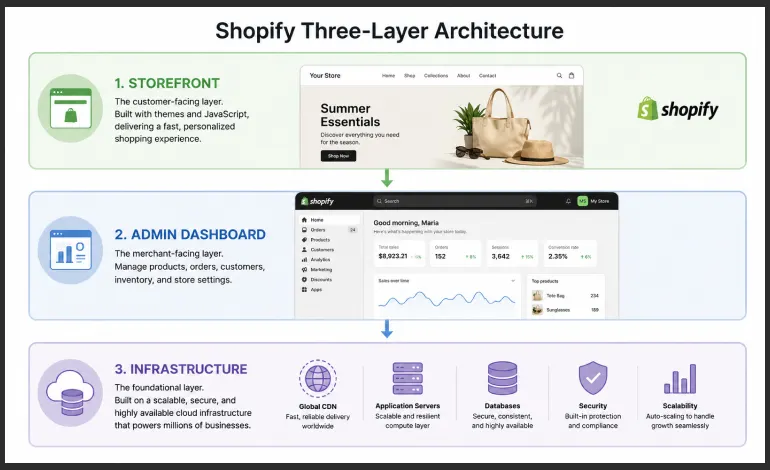
Think of Shopify as having three layers that work together behind the scenes while you focus on selling:
Layer 1: Your Storefront (What Customers See)
Shopify gives you a website — your online store. You pick a theme (a pre-designed layout), customise it with your logo, colours, and product images, and that becomes the site your customers visit and shop from. No design experience needed. In 2026, Shopify’s new Horizon theme collection is built specifically so that anyone can create a professional-looking store without touching a single line of code.
Layer 2: Your Backend (What You Manage)
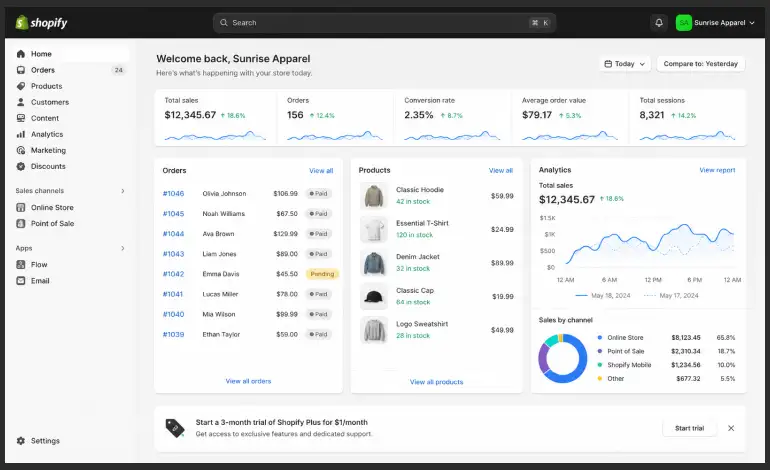
Behind the scenes, Shopify gives you an admin dashboard — a control centre where you manage everything. You add products here. You see orders coming in. You track your inventory. You view analytics. You set up discounts. Everything is in one place, organised and accessible from any device.
Layer 3: The Infrastructure (What Shopify Handles For You)
This is the part most beginners don’t realise they’re getting. Shopify silently handles:
- Hosting — your store lives on Shopify’s servers with 99.9% uptime
- Security — SSL certificates and PCI compliance (the technical requirements for safely processing payments)
- Speed — your store loads fast globally because Shopify uses a distributed content delivery network
- Updates — Shopify updates itself. You never need to apply patches or worry about maintenance
- Checkout — Shopify’s checkout is consistently one of the highest-converting in the industry
All of that runs in the background so you never have to think about it.
What Can You Sell on Shopify?
More than most people realise. Here’s what Shopify supports out of the box:
- Physical products — clothing, home goods, electronics, handmade items, anything you ship
- Digital products — ebooks, templates, software, music, online courses, Lightroom presets
- Services — consultations, bookings, and session-based offerings
- Subscriptions — recurring products like monthly boxes or membership plans (via apps)
- Dropshipping products — you sell, your supplier ships. You never touch the inventory
- Print-on-demand — you design it, a print-on-demand service produces and ships it to your customer
The only things you can’t sell are items prohibited under Shopify’s Acceptable Use Policy (which covers illegal goods and specific restricted categories).
Beginner-friendly tip: If you don’t have a product yet, dropshipping or print-on-demand are the most common zero-inventory ways to start. Both are fully supported in Shopify through apps like DSers (for dropshipping) and Printful or Printify (for print-on-demand).
What Does Shopify Actually Give You? Key Features Explained
1. Store Builder With AI Assistance
You build your store visually — drag sections, adjust layouts, update text and images. In 2026, Shopify added Shopify Magic, an AI tool that generates product descriptions, emails, and store copy from a short prompt. It also launched a new AI-powered assistant called Sidekick, which acts as a 24/7 business advisor inside your dashboard. Ask it anything — “how do I set up free shipping for orders over $50?” — and it walks you through it.
2. Product & Inventory Management
You can list unlimited products on every Shopify plan. Each product can have up to 100 variants (different sizes, colours, materials). Shopify tracks your inventory automatically, alerts you when stock is low, and can pause sales of products that run out.
3. Payments — Built Right In
Shopify has its own payment processor called Shopify Payments, which means you can start accepting credit cards, debit cards, Apple Pay, and Google Pay without connecting a third-party payment gateway. If you prefer PayPal, Stripe, or another processor, those are available too — though using a third-party processor incurs a small additional transaction fee depending on your plan.
4. Multichannel Selling
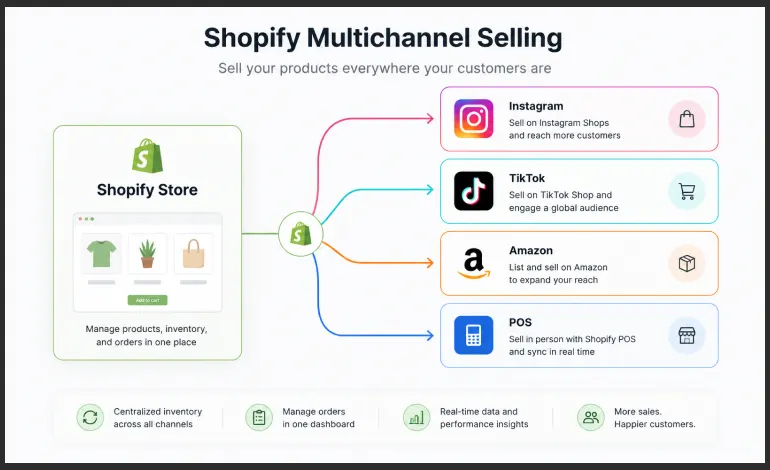
Your Shopify store is the hub, but you’re not limited to it. Shopify lets you connect your store to sell across multiple channels simultaneously — Instagram, Facebook, TikTok Shop, Google Shopping, Amazon, eBay, and in-person via Shopify’s POS (Point of Sale) system. All orders flow back into the same Shopify dashboard, so your inventory and sales data stay in sync.
5. The Shopify App Store
Shopify’s app ecosystem is one of its biggest advantages. There are over 13,000 apps in the Shopify App Store covering virtually every need: email marketing, upsells, reviews, loyalty programmes, accounting, shipping labels, dropshipping, SEO, live chat, and much more. Most essential apps have free plans. This is how Shopify stays simple for beginners while being powerful enough for enterprise businesses.
6. Analytics and Reports
Shopify’s built-in analytics show you where your customers are coming from, what they’re buying, what they’re abandoning at checkout, and how your store is performing over time. Higher-tier plans unlock more detailed reports. Even on the Basic plan, you have enough data to make informed decisions as a new store owner.
7. Shopify Shipping
If you ship physical products, Shopify has pre-negotiated discounted shipping rates with carriers like USPS, UPS, DHL, and others (rates and carriers vary by country). You can print shipping labels directly from your admin. For US merchants, the savings can offset a meaningful portion of your monthly plan cost.
What Running a Shopify Store Actually Looks Like
Most guides describe features. This section shows you what a normal day actually looks like once your store is live – because understanding the day-to-day helps you decide if Shopify makes sense for your situation.
Morning: You open your phone and see three new orders came in overnight. You check Shopify’s mobile app, review the orders, and click ‘Fulfil’. Shopify prints the shipping labels automatically.
Afternoon: A customer messages asking about sizing. You reply through Shopify Inbox. You also add a new product you’ve been testing — write the description, upload photos, set the price, done in 10 minutes.
Evening: You check your analytics. Tuesday’s Instagram post drove 43 visitors. 4 of them bought. You update next week’s discount code and schedule an email campaign through Shopify Email.
That’s the actual rhythm of running a Shopify store. No servers. No technical maintenance. No developer needed for day-to-day operations.
How Much Does Shopify Cost? Honest Pricing Breakdown
Shopify runs on a monthly subscription model. Here are the current plans as of 2026:
Plan | Price/mo | Who It's For | Key Limits & Notes |
Basic | $25 | New stores just launching | Full store, unlimited products, No staff accounts, basic reports. |
Grow | $65 | Growing stores | 5 staff accounts, professional reports, lower transaction fees. |
Advanced | $399 | Scaling businesses | 15 staff accounts, advanced reports, third-party calculated shipping. |
Plus | $2,300+ | Enterprise brands | Custom checkout, dedicated support, B2B, and multi-store management. |
Annual billing saves money: All plans are cheaper when billed annually vs month-to-month — typically around 25% less. Shopify also frequently runs a promotional trial (currently 3 days free, then $1/month for 3 months on select plans). Check shopify.com/pricing for the current offer before signing up.
Transaction fees – what to know: If you use Shopify Payments as your payment processor, there are no additional Shopify transaction fees. If you use a third-party payment processor (PayPal, Stripe, etc.), Shopify charges an additional fee of 2% on Basic, 1% on Grow, and 0.5% on Advanced. For most new stores, using Shopify Payments is the simplest and most cost-effective setup.
My recommendation for new stores: Start on the Basic plan. It includes everything you need to launch, a full store, unlimited products, Shopify Payments, and basic analytics. Upgrade when your revenue makes the higher plan fees worthwhile.
📌 Always verify: Shopify adjusts its pricing and promotions regularly. Check the official pricing page at shopify.com/pricing before making any purchase decision.
Shopify vs Other Platforms: How It Stacks Up
Shopify | WooCommerce | Wix | Squarespace | |
Built For | eCommerce | eCommerce | General sites | Portfolios |
Hosting Included | Yes | No (self) | Yes | Yes |
Ease of Use | Easy | Moderate | Very Easy | Easy |
App/Plugin Count | 13,000+ | 59,000+ | ~300 | ~40 |
Inventory Tools | Excellent | Good | Basic | Basic |
Multi-channel Sales | Yes | Yes (plugins) | Limited | No |
Free Plan | Trial only | Free core | Yes | No |
Starting Price | $25/mo | ~$0+hosting | ~$17/mo | ~$19/mo |
Best For | Dedicated stores | WordPress users | Simple shops | Portfolio shops |
Shopify vs WooCommerce
WooCommerce is a free plugin for WordPress. It’s extremely flexible and has more plugins than any other eCommerce solution — but you’re responsible for your own hosting, security, backups, and updates. For beginners who want to sell without managing a server, Shopify is far less stressful. For developers or budget-first users comfortable with WordPress, WooCommerce has real advantages.
Shopify vs Wix
Wix is excellent for simple websites and basic online shops. But its eCommerce features plateau quickly — limited inventory tools, fewer integrations, and no real scalability for a growing store. If selling is the primary goal, Shopify is the stronger long-term choice.
Shopify vs Squarespace
Squarespace is a strong choice for portfolio sites and shops where design and presentation are the top priority. Its eCommerce functionality works well for small, design-led stores. But it can’t match Shopify’s app ecosystem, multichannel selling, or inventory depth for serious stores.
Should You Use Shopify? Here’s the Honest Answer
Yes — if selling products is the main point of your site.
Shopify is the platform I’d recommend if:
- You want to sell physical products, digital downloads, or dropshipped items
- You want a professionally managed platform that handles hosting, security, and payments for you
- You plan to grow and need a platform that scales from 10 orders a month to 10,000
- You want to sell across multiple channels (Instagram, TikTok, Amazon) from one dashboard
- You don’t have developer skills and need something you can manage yourself
Consider alternatives if:
- Your site is primarily content or portfolio-based — Webflow or Framer will produce better-looking results for non-store sites
- Budget is extremely tight and you’re comfortable with WordPress — WooCommerce’s free core plugin has no monthly fee
- You’re only selling one or two digital products — a simpler tool like Gumroad or Lemon Squeezy may be more cost-effective to start
The bottom line: for anyone serious about building an online store, Shopify is the most complete, beginner-friendly, and scalable option available in 2026. The free trial means you can explore everything before spending a cent.
Ready to see it for yourself? Shopify’s free trial lets you build your store, add products, and explore every feature before paying anything. No credit card required to start.
Frequently Asked Questions About Shopify
Q: Is Shopify free to use?
Shopify doesn’t have a permanent free plan, but it offers a free trial so you can build and explore your store before committing. After the trial, plans start at $5/month (Starter) for social selling or $29/month (Basic) for a full online store. Shopify frequently runs promotional pricing — check shopify.com/pricing for the current offer.
Q: Do I need technical skills to use Shopify?
No. Shopify is designed for people with no coding or design experience. The store builder is visual, the admin dashboard is straightforward, and Shopify’s AI assistant Sidekick can answer questions and guide you through any setup step. Most beginners have a working store live within a few hours of signing up.
Q: Can I use my own domain name with Shopify?
Yes. You can connect a domain you already own, or purchase a new one directly through Shopify. Using a custom domain (e.g. yourstore.com instead of yourstore.myshopify.com) is available on all paid plans and strongly recommended for any store you want to look professional.
Q: Does Shopify take a percentage of my sales?
Shopify charges transaction fees only if you use a third-party payment processor (not Shopify Payments). If you use Shopify’s built-in payment system, there are no additional Shopify transaction fees — you only pay standard card processing rates. The fee for third-party processors is 2% on Basic, 1% on Grow, and 0.5% on Advanced.
Q: Is Shopify good for beginners with no business experience?
Yes — arguably better than any alternative. The platform guides you through setup step by step, Shopify Academy offers free courses for new sellers, and the new AI assistant Sidekick can answer business questions in plain English. Every 26 seconds, a merchant makes their first-ever sale on Shopify. You don’t need experience to start.
Conclusion
So, what is Shopify? It’s the platform that handles everything a physical retailer takes for granted — a storefront, a cash register, a stock room, a receipt printer, and a customer list — but for selling online. You bring the product and the ambition. Shopify provides the infrastructure.
It’s not the cheapest option out there. It’s not the most design-flexible. But for anyone whose primary goal is to sell products online and grow over time, it’s the most complete, most reliable, and most beginner-friendly platform available in 2026.
The smartest first step? Use the free trial. Build your store, add your products, see how the checkout works. You’ll know within an afternoon whether Shopify feels right for what you’re building.
Start Your Free Shopify Trial →
Looking for a head start? Check our details guide about Best Website Builders for Beginners.
