

You’ve published some articles. Maybe a few product reviews or how-to guides. But the traffic isn’t coming, and you’re not sure why. You’ve heard “do SEO” but nobody explains where to actually start — especially not without spending hundreds of dollars on tools you don’t know how to use yet.
That’s the problem this guide solves. The best SEO tools for beginners aren’t always the most powerful ones — they’re the ones you can actually understand, act on, and afford right now. This list is structured as a 3-stage progression: the tools you need on day one, the tools to add as you grow, and the tools worth investing in when you’re ready to compete seriously.
No jargon walls. No list of 50 tools. Just 10 honestly reviewed picks with clear guidance on who each one is for and when to get it.
How to Read This List: The 3-Stage Approach
Most “best SEO tools” lists dump 10–20 tools on you with no sense of order. That’s overwhelming for a beginner because the answer to “which tool first?” isn’t obvious. Here’s the framework this article uses:
Stage 1 — Free Foundation (Start Here Today): Tools that are completely free and essential for every website owner. Set these up before anything else.
Stage 2 — Budget-Friendly Growth ($12–$50/mo): Affordable tools that add real competitive power once you have a few articles published and need to find better keywords.
Stage 3 — Serious Investment ($99–$140+/mo): Professional-grade tools worth investing in when your site is generating traffic and you need to compete in tougher niches.
📌 Start here: If you’re brand new to SEO, spend your first month entirely on Stage 1 tools. They’re free, they come directly from Google, and they will teach you more about your site than any paid tool can.
Quick Reference: All 10 Tools at a Glance
Tool | Starting Price | Free Option? | Stage | Best For |
Google Search Console | Free forever | Yes | Stage 1 | Tracking your own rankings |
Google Analytics 4 | Free forever | Yes | Stage 1 | Understanding your traffic |
Rank Math SEO | Free (plugin) | Yes | Stage 1 | On-page SEO for WordPress |
Yoast SEO | Free (plugin) | Yes | Stage 1 | Beginner-friendly WordPress SEO |
Ubersuggest | From $12/mo | Limited | Stage 2 | Budget keyword research |
Mangools | From $30.50/mo | Trial | Stage 2 | Low-competition keyword finding |
Screaming Frog | Free (500 URLs) | Yes | Stage 2 | Site health checks |
Surfer SEO | From $99/mo | No | Stage 3 | Content optimisation for ranking |
Semrush | From $139.95/mo | Trial | Stage 3 | All-in-one SEO + competitor intel |
Ahrefs | From $129/mo | Free AWT | Stage 3 | Backlinks + deep competitor analysis |
# STAGE 1 Free Foundation — Set these up before anything else
#1. Google Search Console — The Most Important SEO Tool, Full Stop
| 💰 Cost: Free forever — No sign-up fee, no trial, no catch
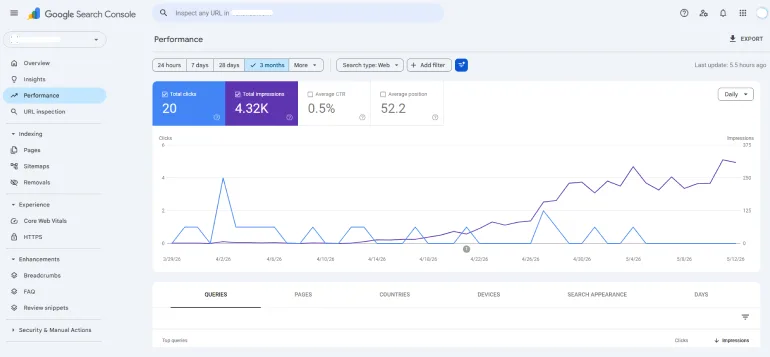
Before you spend a single dollar on SEO tools, set up Google Search Console. It’s a free tool directly from Google that shows you exactly how your site is performing in search results — which pages are showing up, how many people are clicking, which keywords triggered your pages, and any technical problems Google has found.
No third-party tool can replicate this because the data comes directly from Google itself. If Google has indexed your page, Search Console knows about it. If Google can’t crawl a page, Search Console tells you why.
What beginners should actually do with it: Once connected, go to the Performance report and look at which pages have the most impressions but low clicks. These pages are already showing up in search — they just need better titles or meta descriptions to get more people to click. This is your fastest win.
✅ What Beginners Will Love
- 100% free with no limits or expiry
- Data comes directly from Google — no estimates or guesswork
- Shows you which keywords are already bringing visitors to your site
- Alerts you to indexing errors, mobile usability issues, and Core Web Vitals problems
- Works for every website, not just WordPress
❌ Watch Out For
- Can only show data for sites you own or manage — no competitor analysis
- Data is delayed by 2–3 days, so it’s not truly real-time
- Interface can feel unfamiliar at first — takes a few sessions to get comfortable
Best For: Every website owner at every stage. If you haven’t connected your site to Google Search Console yet, do it today before reading the rest of this article. It’s the single most important SEO action you can take for free.
#2. Google Analytics 4 — Understand Where Your Traffic Actually Comes From
| 💰 Cost: Free forever
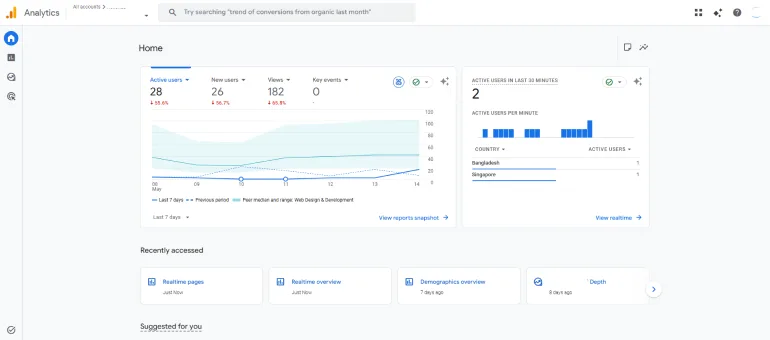
Google Analytics 4 (GA4) is the companion to Search Console. Where Search Console tells you about your Google rankings and clicks, GA4 tells you what visitors do once they arrive on your site. How long do they stay? Which pages do they visit? Do they click your affiliate links? Do they leave immediately?
For beginners building affiliate sites, GA4 is how you find out which articles are actually converting readers into affiliate clicks and which ones get traffic but generate nothing. That data changes your content strategy dramatically.
Key beginner use: Set up GA4 on day one, then check it weekly. Look at which pages have the highest “engagement rate” (people staying and reading) vs highest “bounce rate” (people leaving immediately). Pages with high traffic but high bounce rate tell you something’s off — the content doesn’t match what searchers expected.
✅ What Beginners Will Love
- Free with no usage limits
- Shows user behaviour, not just traffic numbers
- Real-time reporting to see who’s on your site right now
- Integrates directly with Google Search Console for a combined view
- Event tracking lets you see affiliate link clicks without extra tools
❌ Watch Out For
- GA4 has a learning curve; the interface changed significantly from Universal Analytics
- Requires a small code snippet added to your site (easy with a plugin like Site Kit)
- Reports can feel overwhelming until you know which ones to focus on
Best For: Every website owner from day one. Install it alongside Search Console. Google’s own Site Kit plugin installs both tools in one step if you’re on WordPress.
#3. Rank Math SEO — The Best Free WordPress SEO Plugin in 2026
| 💰 Cost: Free plan available. Rank Math Pro from $7.99/mo (billed annually). Verify at rankmath.com
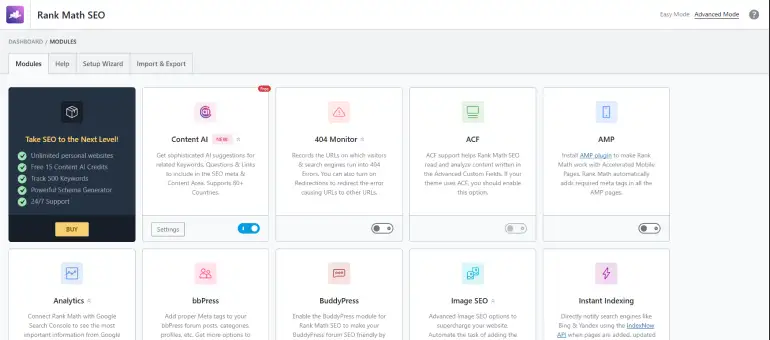
If your site runs on WordPress, you need an SEO plugin to handle the basics: writing meta titles and descriptions, generating a sitemap, adding schema markup (the structured data that helps Google understand your content), and redirecting broken links. Rank Math does all of this and more, and its free plan is significantly more feature-rich than most competitors’ paid plans.
Rank Math’s free version includes: an on-page SEO analyser that scores your content against a keyword as you write, built-in schema types including FAQ and Article schema (which is what generates those star ratings in Google results), a Google Search Console integration that shows your keyword rankings right inside WordPress, 404 monitoring, and basic rank tracking.
Why beginners love it: The content score feature gives you a checklist of SEO improvements as you write. Green means good, orange means needs work. You don’t need to know what “meta description” or “semantic keywords” means — Rank Math explains each item in plain language and lets you fix it with one click.
✅ What Beginners Will Love
- Free plan includes features that competitors charge for (schema markup, redirect manager)
- Live content score with actionable checklist while writing posts
- Google Search Console integration shows rank data inside WordPress dashboard
- FAQ schema generator is built right in — creates the JSON-LD automatically
- Active development team with frequent updates
❌ Watch Out For
- WordPress only — no help if your site is on Wix, Squarespace, or Framer
- Advanced features like rank tracking for multiple keywords require Pro plan
- Some settings require understanding of SEO concepts to configure correctly
Best For: Every WordPress user from day one. Install it first, before you write your second article. The on-page score alone will immediately improve the quality of everything you publish.
#4. Yoast SEO — The Beginner-Friendly Classic (Still Relevant in 2026)
| 💰 Cost: Free plan available. Yoast SEO Premium from $118.80/year. Verify at yoast.com
Yoast SEO is the most-installed WordPress SEO plugin in history. It’s been the default recommendation for beginners for over a decade because it does one thing exceptionally well: it makes SEO simple enough for people who know nothing about it.
The famous traffic light system — red, orange, and green dots next to each criterion — tells you at a glance what’s wrong and what’s right about your page’s SEO. The readability analysis (which analyses your writing structure, sentence length, and paragraph length) is unique and genuinely useful for new bloggers.
Rank Math vs Yoast for beginners: Rank Math’s free plan has more features overall. But Yoast’s interface is simpler and less overwhelming for someone who has never thought about SEO before. If Rank Math’s feature list feels like too much, start with Yoast. You only need one — don’t install both.
✅ What Beginners Will Love
- Traffic light system is genuinely beginner-friendly and easy to act on
- Readability analysis helps improve writing quality, not just SEO
- New Yoast AI Generate feature creates optimised meta titles and descriptions automatically
- Trusted, mature plugin with massive community and documentation
- Free plan covers everything a beginner needs
❌ Watch Out For
- Free plan is more limited than Rank Math’s free plan (no schema, no redirects)
- Premium plan at $118.80/year required for internal linking suggestions, redirects, and multiple focus keywords
- Can feel limiting as your site grows and you need more control
Best For: Complete beginners who want the most hand-holding. If you’ve never thought about SEO before, Yoast’s simplicity is comforting. If you’re ready to dive deeper from the start, install Rank Math instead.
# STAGE 2 Budget-Friendly Growth — Once you have content published and need better keyword data
#5. Ubersuggest — The Most Affordable Paid SEO Tool for Beginners
| 💰 Cost: Free limited plan. Individual from $12/mo. Check neilpatel.com/ubersuggest for current pricing
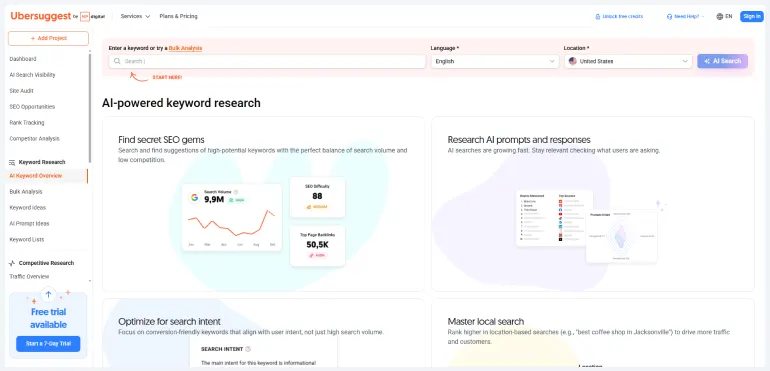
Created by Neil Patel, Ubersuggest is the most beginner-friendly paid SEO tool on the market and the cheapest entry point into real keyword research. For $12/month, you get keyword research, rank tracking for your own site, a site audit tool, and competitor analysis — the four core SEO functions that most other platforms charge 10x more for.
In 2026, Ubersuggest added AI visibility tracking — showing how your brand appears in AI-generated answers from LLMs. For a $12/month tool, that’s a genuinely forward-thinking addition.
What beginners actually use it for: Type in a keyword and Ubersuggest shows you the monthly search volume, how difficult it is to rank for, and a list of related keyword variations. The “Content Ideas” section shows you which articles about that topic have the most backlinks and social shares, giving you a sense of what makes content succeed in your niche.
✅ What Beginners Will Love
- Most affordable entry point into real paid keyword research at $12/month
- Clean, simple interface — less overwhelming than Semrush or Ahrefs
- AI visibility tracking included — rare at this price point
- Chrome extension shows SEO data while browsing Google results
- Site audit tool included at no extra cost
❌ Watch Out For
- Keyword volume data can feel inflated compared to Google’s own data in Search Console
- Backlink database is notably smaller and less accurate than Ahrefs or Semrush
- Limited daily searches on lower plans
- Not suitable once your site grows and you need deeper competitor intelligence
Best For: Bloggers and affiliate site owners who have published 10–20 articles and need to start doing proper keyword research without a large budget. At $12/month it’s lower risk than committing to a $140/month Semrush subscription before you know what you need.
#6. Mangools (KWFinder) — The Best Beginner Tool for Finding Winnable Keywords
| 💰 Cost: From $30.50/mo (billed annually, saving 35%). Verify current pricing at mangools.com/plans-and-pricing
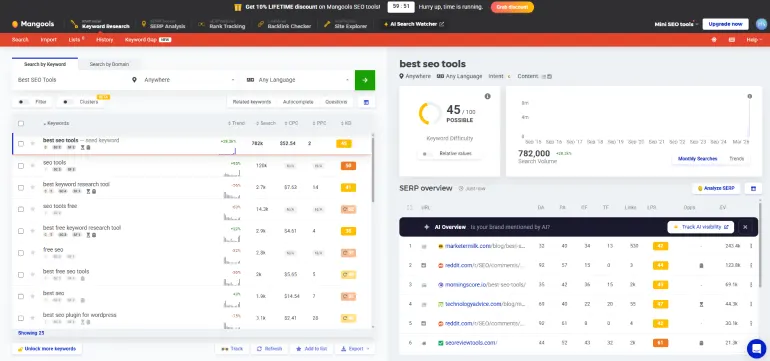
Mangools is a bundle of five SEO tools with one standout: KWFinder, which is widely considered the best tool for finding low-competition keywords that a new site can actually rank for. Most beginners make the mistake of targeting keywords that are too competitive. KWFinder’s keyword difficulty score is particularly well-regarded for accuracy, and its colour-coded visual makes it immediately obvious which keywords are realistic targets.
The five tools in Mangools are: KWFinder (keyword research), SERPChecker (analyse who’s ranking for a keyword), SERPWatcher (track your own keyword rankings), LinkMiner (basic backlink analysis), and SiteProfiler (domain overview for competitors). Together, they cover everything a beginner needs to start doing competitive keyword research.
✅ What Beginners Will Love
- KWFinder’s keyword difficulty score is highly trusted among beginners and pros alike
- Beautiful, clean interface that’s genuinely enjoyable to use
- Five tools bundled for one price — covers keyword research, rank tracking, and basic backlinks
- SERP analysis shows you exactly who you’d be competing with for any keyword
- 48-hour money-back guarantee reduces the risk of trying it
❌ Watch Out For
- Backlink database (LinkMiner) is smaller than Ahrefs or Semrush — not a substitute for deep link analysis
- Daily search limits apply across all tools, which can feel restrictive during heavy research sessions
- Not ideal once you need advanced site auditing or content optimisation features
Best For: New bloggers and affiliate site owners who want to do keyword research properly but aren’t ready to spend $140/month. If finding realistic, low-competition keywords is your main goal right now, Mangools’ KWFinder is the best tool at this price point.
#7. Screaming Frog SEO Spider — The Best Free Tool for Fixing Site Problems
| 💰 Cost: Free for up to 500 URLs. Paid licence $279/year. Verify at screamingfrog.co.uk
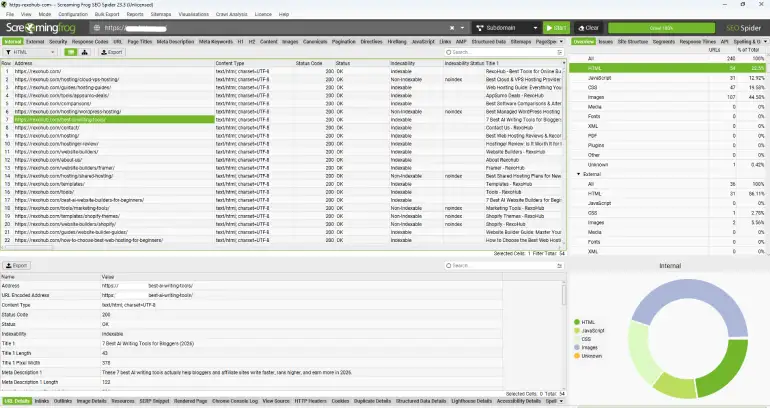
Screaming Frog is a website crawler — it visits every page of your site the same way Google does, then shows you a complete list of technical problems. Broken links that return a 404 error. Pages with missing meta descriptions. Images without alt text. Duplicate page titles. Redirect chains. These are the kinds of technical SEO issues that silently hurt your rankings, and you’d never know they exist without a crawl tool.
For sites under 500 pages, the free version of Screaming Frog is completely sufficient — there’s no time limit, no feature gating, and no credit card required. Most beginner blogs and affiliate sites will stay within 500 pages for at least their first year, making this a genuinely free professional tool.
What to do with it: Run a crawl of your site, then sort the results by “Status Code”. Any URL showing 404 is a broken page that needs fixing or redirecting. Sort by “Title 1” and look for any blank cells — those are pages missing meta titles. Fix these in order of priority and you’ll see measurable improvements in how Google treats your site.
✅ What Beginners Will Love
- Free version handles up to 500 URLs — enough for most beginner sites
- Industry-standard tool used by professional SEOs worldwide
- Finds technical issues that no other free tool surfaces as clearly
- No subscription — the paid license is a one-time annual purchase, not monthly
- Exports data to CSV/Excel for further analysis
❌ Watch Out For
- Desktop application only — requires download and installation
- Interface is data-heavy and can feel overwhelming at first
- Results require some basic SEO knowledge to interpret correctly
- No cloud version — can’t share crawls with teammates easily
Best For: Every website owner with more than 20 published pages. Run a Screaming Frog crawl once every 1–2 months as a site health check. It consistently surfaces issues that are silently hurting rankings.
# STAGE 3 Serious Investment — When you’re ready to compete for higher-traffic keywords
Don’t skip the stages: Stage 3 tools are powerful — but spending $140/month before you have content indexed and traffic arriving is wasting money. Most beginners should spend their first 3–6 months on Stage 1 and 2 tools before graduating to Stage 3.
#8. Surfer SEO — The Best Tool for Writing Content That Actually Ranks
| 💰 Cost: Standard plan from $99/mo. Scale from $299/mo. Verify at surferseo.com
Surfer SEO does one thing exceptionally well: it looks at the top-ranking pages for your target keyword and shows you exactly what your article needs to include to compete with them. Word count, how many times to use specific keywords, how many headings to use, which related terms the top pages mention, and what images to include. You write inside Surfer’s editor and a live Content Score updates in real time.
The reason this matters for beginners: without Surfer, you’re guessing what Google wants to see. With Surfer, you have a data-driven checklist based on the pages that are already ranking. That’s not cheating, it’s understanding what comprehensiveness looks like for a given topic.
In 2026, Surfer also added GEO (Generative Engine Optimization) features on its Scale and above plans — helping your content appear not just in Google but in AI-generated answers from ChatGPT, Perplexity, and Google AI Overviews. Note on pricing: Surfer has increased its pricing significantly over the past few years. Always verify the current price at surferseo.com before purchasing.
✅ What Beginners Will Love
- Content Score makes the optimisation process concrete and measurable
- NLP term suggestions mean your content covers the topic comprehensively, not just a target keyword
- Audit feature lets you optimise existing articles that aren’t ranking yet
- Direct integrations with Google Docs and WordPress
- Proven results — consistently referenced by SEO professionals as the top content optimisation tool
❌ Watch Out For
- Expensive — at $99/month for Essential, it’s a significant commitment for a beginner
- Chasing a perfect score can lead to unnatural writing — aim for 75–85, not 100
- Doesn’t do keyword research or backlink analysis — you’ll still need a separate tool for those
Best For: Bloggers and affiliate site owners who are actively publishing content and want to improve their ranking chances. Pair it with a keyword research tool (Mangools or Semrush) for a complete content workflow.
#9. Semrush — The Most Complete All-in-One SEO Tool for Growing Sites
| 💰 Cost: SEO $139.95/mo ($117.33/mo annually). Pro+ $299/mo ($248.17/mo annually). 7-day free trial available. Verify at semrush.com/pricing
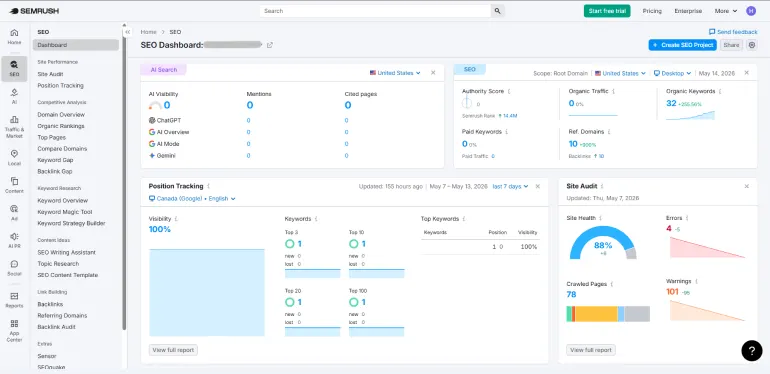
Semrush is the most comprehensive SEO platform on the market — and one of the most expensive starting points. It handles keyword research, site auditing, backlink analysis, rank tracking, competitor intelligence, and in 2026, AI visibility tracking (how your brand appears in ChatGPT, Gemini, and Perplexity). It’s a Swiss Army knife that replaces the need for several separate tools.
Which plan for beginners: Start with SEO ($139.95/month or $117.33/month annually). It includes keyword research, site audits, rank tracking for 500 keywords across 5 projects, and competitor analysis. Most beginners won’t need Guru until they’re managing multiple sites or need the Content Marketing Toolkit. The 7-day free trial gives full Pro access — use it to run a full competitor analysis before deciding.
The honest limitation: Semrush SEO at $117/month is genuinely expensive for a beginner with no revenue yet. If you’re still building your first 20–30 articles, Mangools at $30.50/month covers keyword research just as well. Semrush earns its price once you’re publishing regularly, have traffic coming in, and need competitor intelligence at a depth that budget tools can’t match.
✅ What Beginners Will Love
- 25+ billion keyword database across 119 countries — most comprehensive available
- Competitor keyword analysis is unmatched — see exactly what any domain ranks for
- All-in-one platform replaces Mangools, a standalone rank tracker, and a site audit tool
- Semrush Copilot AI gives personalised SEO recommendations automatically
- AI visibility tracking (via Semrush One) tracks brand presence in ChatGPT, Gemini, and others
❌ Watch Out For
- Expensive for beginners — $117/month annually is hard to justify without revenue
- Content Marketing Toolkit (for content briefs and optimisation) requires Pro+ ($299/mo)
- Additional user seats cost extra — team pricing adds up fast
- Annual billing means a large upfront commitment
Best For: Site owners who are actively generating traffic, managing multiple projects, or ready to do serious competitor analysis. The 7-day free trial is the best way to evaluate it before committing.
#10. Ahrefs — The Best Tool for Backlink Analysis and Competitive Research
| 💰 Cost: Lite $129/mo. Standard $249/mo. Free Ahrefs Webmaster Tools for your own site. Verify at ahrefs.com/pricing
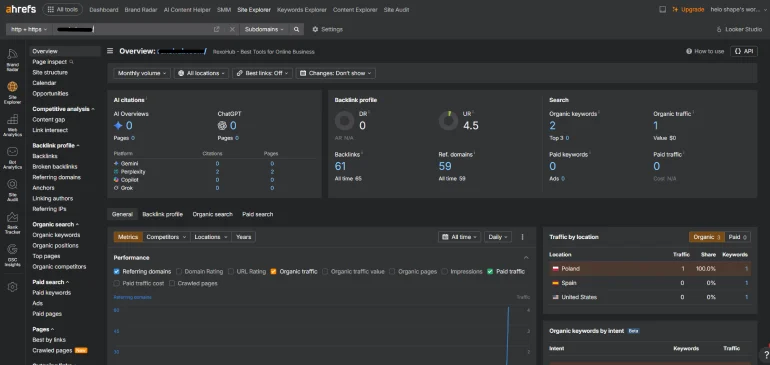
Ahrefs is Semrush’s main competitor, and for backlink analysis specifically, it’s the better tool. Its web crawler processes billions of pages daily and its backlink database is updated every 15–30 minutes making it the most current and comprehensive backlink index available. If understanding who links to your competitors (and how to earn similar links) is your priority, Ahrefs is where to go.
The free Ahrefs Webmaster Tools (AWT) — a hidden gem: By verifying your own site for free, you get access to Site Audit (which finds technical SEO issues) and Site Explorer (which shows your backlink profile and organic keywords) for your own domain, no paid subscription needed. This is genuinely powerful and consistently overlooked by beginners.
2026 update: Ahrefs launched an AI forecasting model in 2026 that predicts how your keyword rankings will improve over time based on your current trajectory. This makes prioritisation decisions much clearer. Ahrefs also launched an MCP server in early 2026, allowing AI tools to query Ahrefs data via natural language commands.
✅ What Beginners Will Love
- Free Ahrefs Webmaster Tools gives site audit and backlink data for your own domain at no cost
- Most accurate and frequently updated backlink database in the industry
- Content Explorer finds the most-linked content in any niche — invaluable for link building ideas
- Keywords Explorer covers 12 search engines including YouTube and Amazon
- Clean, focused interface — less overwhelming than Semrush for first-time users
❌ Watch Out For
- Lite Plan at $129/month uses a credit system that can feel limiting for heavy research
- No built-in content writing or optimisation tools — needs Surfer SEO alongside it
- Ahrefs traffic estimates can significantly overestimate real traffic vs Google Search Console data
Best For: Established site owners who want the deepest backlink intelligence available, or beginners who want to start with Free Ahrefs Webmaster Tools to audit their own site without paying. For pure keyword research, Semrush’s database is larger; for backlink analysis, Ahrefs leads.
Which SEO Tools Should You Actually Start With?
Here’s the plain-language recommendation based on where you are right now:
If you’re just starting your first site today:
- Install Google Search Console + Google Analytics 4 (both free, both essential)
- Install Rank Math SEO (WordPress) or Yoast SEO (WordPress) — free
- Use Ahrefs Free Webmaster Tools for your own site’s backlink and audit data
- Monthly cost: $0 — everything you need to get started properly
If you have 20+ articles published and want to grow faster:
- Add Mangools at $30.50/month — start finding lower-competition keywords
- Use Screaming Frog free to do a monthly technical SEO health check
- Monthly cost: ~$30.50 — real keyword research without breaking the budget
If you’re generating traffic and want to compete seriously:
- Add Semrush SEO ($117.33/mo annually) or Ahrefs Lite ($129/mo) for competitor intelligence
- Add Surfer SEO Standard Plan ($99/mo) if content quality is your primary focus
- Monthly cost: $117.33–$250 — professional-grade tools that justify their cost with measurable results
The most important thing: Don’t spend $140/month before you have content indexed and ranked. Build first, optimize second, scale third. The free tools in Stage 1 are more powerful than most beginners realise.
Frequently Asked Questions
Q: What are the best free SEO tools for complete beginners?
The best free SEO tools for beginners are Google Search Console, Google Analytics 4, Rank Math SEO (for WordPress), and Ahrefs Free Webmaster Tools (for your own site’s data). Combined, these four free tools give you rankings data, traffic analysis, on-page optimisation guidance, and a basic backlink profile — everything you need to get started without spending a cent.
Q: Do I need to pay for SEO tools to rank on Google?
No. Many sites rank well using only free tools. Google Search Console and Google Analytics alone give you enough data to improve your rankings if you act on what they tell you. Paid tools become valuable when you need competitor intelligence, deep keyword research, or content optimisation data — but these matter more after you have an established site than when you’re just starting out.
Q: Is Semrush worth it for a beginner?
It depends where you are. Semrush Pro at $117.33/month annually is hard to justify if you haven’t published 20–30 quality articles yet. Its value becomes much clearer once you have content ranking and need to do serious competitor research, find content gaps, and track keyword movements across many pages. For beginners, Mangools at $30.50/month covers keyword research well enough at a much lower cost.
Q: What is the difference between Rank Math and Yoast SEO?
Both are WordPress SEO plugins that handle meta titles, meta descriptions, sitemaps, and on-page optimisation. Rank Math’s free plan includes more features (schema markup, redirect manager, rank tracking for a few keywords, Google Search Console integration). Yoast’s free plan is simpler and more beginner-friendly but requires Yoast Premium for redirects and multi-keyword focus. Most SEO professionals recommend Rank Math for anyone who can handle a slightly more feature-rich interface.
Q: What is the best SEO tool for finding keywords a new site can rank for?
Mangools KWFinder is widely considered the best tool for finding low-competition, achievable keywords for new sites. Its keyword difficulty score is accurate and well-regarded, and the visual interface makes it easy to spot keywords that are realistically within reach. At $30.50/month, it’s the most cost-effective tool for this specific job.
Conclusion: Start With Free, Upgrade With Purpose
The best SEO tools for beginners aren’t the most expensive or the most feature-loaded. They’re the ones that give you actionable insights you can actually act on right now, at a price that matches where your site is today.
Start with Stage 1: set up Google Search Console, Google Analytics 4, and Rank Math SEO. Use Ahrefs Free Webmaster Tools to understand your site’s health. These tools are free, they come from the most trusted sources in the industry, and they will teach you more about SEO than any course.
When you’re ready to grow, add Mangools for keyword research. When you’re ready to compete seriously, Semrush or Ahrefs will give you the competitive intelligence to do it properly.
The order matters. The tools only work if the content behind them is genuinely useful to readers. Get that right first.
Ready for the next step? Check our guide about 10 Best AppSumo SEO Tools for Small Websites.
