
You want to build a website. You Google “best website builder,” and within minutes, Webflow keeps coming up. But then you look at it and think: What is Webflow? Is this for designers? Do I need to know the code? Is this overkill for me?
That confusion is completely normal. Webflow is one of the most talked-about tools in web design right now — but most explanations are written for people who already know what HTML and CSS mean.
This guide is different. If you’re a complete beginner, I’ll explain what Webflow is, how it works, who it’s actually built for, and whether you should use it or look elsewhere. No jargon, no hype — just a straight answer.
What Is Webflow, Really?
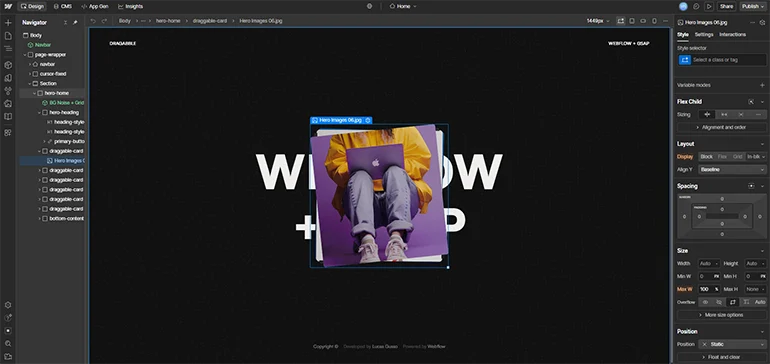
Webflow is a visual website builder that lets you design, build, and publish professional websites without writing a single line of code. You drag and drop elements onto a canvas, style them however you want, and Webflow quietly generates real, clean HTML, CSS, and JavaScript behind the scenes.
That last part matters. Most beginner-friendly builders (think Wix or Squarespace) lock you into pre-made templates with limited flexibility. Webflow gives you the creative control of a developer without asking you to become one.
Webflow officially describes itself as a Website Experience Platform (WXP) — which is their way of saying it handles not just design, but also content management, hosting, SEO, and now AI-powered tools, all from one place.
Big brands like Monday.com, TED, Discord, and Philips use Webflow. But it’s also used by solo bloggers, freelancers, and small businesses who want a beautiful site without hiring a developer.
How Does Webflow Work? (The Simple Version)
Think of Webflow as having three main parts working together:
The Designer (Where You Build)
This is the main editor. It’s a visual canvas where you drag elements — text, images, buttons, sections — onto your page and arrange them however you like. You can adjust colors, fonts, spacing, and layout using controls in the sidebar.
You don’t type any code here. Instead, you’re visually doing what a developer would normally do by writing CSS. It feels like working in a design tool, except the output is a real, live website.
The CMS (Where You Manage Content)
CMS stands for Content Management System — the place where you store and organize your content. Think of it like a smart database.
If you’re running a blog, each post lives in the CMS. If you have a portfolio with 20 projects, each project is a CMS item. You create the template once, and Webflow automatically generates individual pages for each piece of content. This saves enormous time.
Hosting (Where Your Site Lives)
Webflow handles hosting directly. Your site runs on Cloudflare’s global network, which means fast load speeds regardless of where your visitors are located. No separate hosting account needed — it’s built in.
Who Is Webflow Actually For?
Here’s something most articles skip: Webflow is not for everyone, and that’s okay.
Webflow shines brightest for:
- Designers who want to build client websites without relying on developers
- Freelancers who create websites as a service
- Small business owners who want full design control and are willing to invest a bit of learning time
- Startups and marketing teams who need to update website content quickly without a developer
- Bloggers and content creators who want a CMS-powered site that looks more polished than a basic WordPress blog
Webflow may not be the best fit if:
- You need to get a basic site up in under an hour with zero learning curve (Wix or Squarespace are better here)
- You’re building a large online store with complex inventory (Shopify is stronger for this)
- You need a massive plugin ecosystem (WordPress still wins there)
The honest truth? Webflow has a steeper learning curve than most beginner website builders. But the reward for climbing that curve is significantly more creative freedom.
What Can You Actually Build With Webflow?
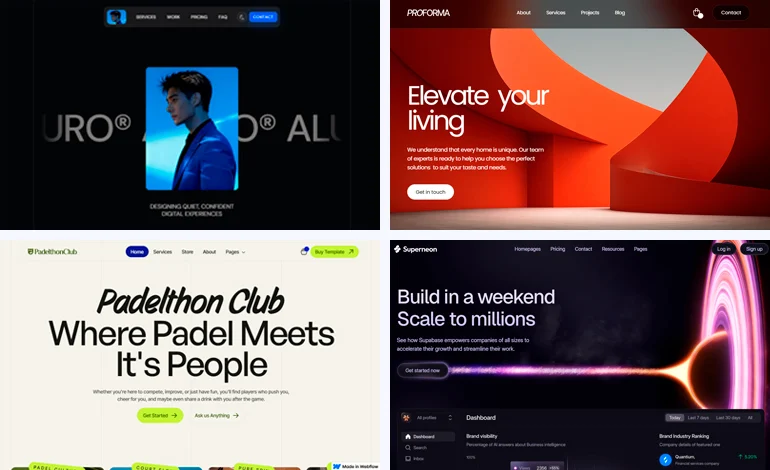
More than you might expect. Here’s a realistic look:
Portfolio Websites
Perfect for photographers, designers, developers, and creatives who want their work to stand out. You control every detail — no two Webflow portfolios need to look alike.
Business and Marketing Websites
Landing pages, company sites, product showcases. Marketing teams love Webflow because they can update content independently without touching the design or waiting on a developer.
Blogs and Content Sites
Webflow’s CMS handles dynamic blog content very well. Each post gets its own auto-generated page, and you control exactly how every element looks.
SaaS and Startup Websites
Many tech startups use Webflow because it produces the polished, animated look associated with high-end web design — without a large development budget.
Small eCommerce Stores
Webflow has built-in eCommerce functionality. It works well for small to mid-sized stores selling physical or digital products. For large catalogs or complex inventory needs, Shopify remains the stronger choice.
What Makes Webflow Different From Other Website Builders?
Real Design Freedom
Most website builders give you templates and let you swap colors and photos. Webflow lets you control the actual layout, spacing, and structure, the same level of control a developer has. That’s rare for a no-code tool.
Clean Code Output
Webflow generates semantic, well-structured HTML and CSS. Your site loads fast and plays nicely with Google. Many developers actually use Webflow to prototype sites faster than they could code from scratch.
Built-In SEO Tools
Webflow includes SEO controls without needing plugins. You can edit meta titles, meta descriptions, add 301 redirects, configure canonical tags, and auto-generate sitemaps. As of 2026, Webflow also includes AI-powered SEO tools that can auto-generate alt text and metadata suggestions.
Animations Without Code
Want smooth scroll animations, hover effects, or page transitions? Webflow lets you build these visually, no JavaScript knowledge required.
All-In-One Platform
Design, CMS, hosting, SEO tools, analytics, and AI-it’s all in one place. You’re not stitching together separate tools for each function.
How Much Does Webflow Cost?
Webflow has a free plan, which is great for learning and experimenting. Here’s the key thing to understand: Webflow has two different types of paid plans, and this confuses a lot of beginners.
Site Plans cover your published website — hosting, CMS, and your custom domain. You pay per site.
Workspace Plans cover your building environment — staging sites, team collaboration, and code export features.
For most beginners building a single site, Site Plans are what matter:
- Free (Starter): Build on a Webflow subdomain (e.g., yoursite.webflow.io). Limited to 2 pages. Great for learning.
- Basic — ~$14/month (billed annually): Simple static sites without a blog or CMS. Good for portfolios and landing pages.
- CMS — ~$23/month (billed annually): The most popular plan. Unlocks Webflow’s CMS for blogs and content-driven sites.
- Business — ~$39/month (billed annually): For high-traffic sites with larger content needs.
Check official pricing: Always verify current prices at webflow.com/pricing before purchasing. Annual billing saves around 20–25% vs month-to-month.
If you’re just starting out, the free plan is genuinely useful. You won’t need to spend a dollar until you’re ready to publish to a custom domain.
Is Webflow Hard to Learn?
This is the most common question — and it deserves an honest answer.
Yes, Webflow has a learning curve. It’s not as plug-and-play as Wix. You’ll need to understand a few concepts like CSS classes, div blocks, and element nesting. These are web design concepts, not coding — but they’re still new ideas if you’ve never built a website before.
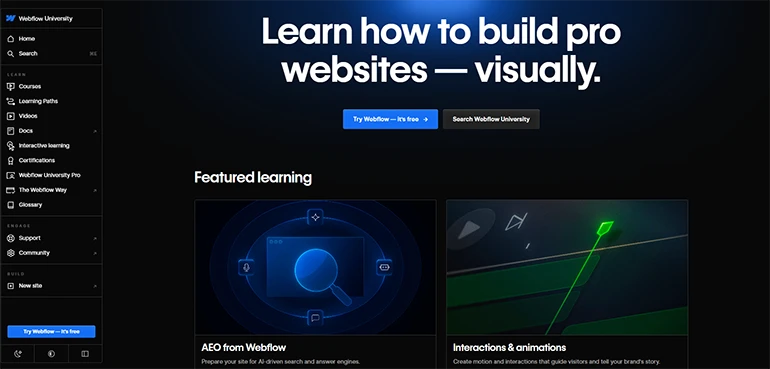
The good news: Webflow University is free, beginner-friendly, and genuinely excellent. It has structured courses, interactive lessons, and short video tutorials. Most beginners grasp the basics within a few days of casual learning.
In 2026, Webflow also added an AI Site Builder that can scaffold an entire website from a text prompt, and an AI Assistant inside the Designer that helps with layouts and suggestions. For beginners, this makes the initial setup far less intimidating.
Realistic expectation: Give yourself a weekend to get familiar with the basics. You won’t master it in a day — but you’ll be building real pages within a few hours.
Webflow vs. Other Website Builders: Quick Comparison
Webflow | Wix | Squarespace | WordPress | |
Ease of Use | Moderate | Easy | Easy | Moderate–Hard |
Design Flexibility | Very High | Medium | Medium | High (plugins) |
Built-In CMS | Yes | Yes | Yes | Yes |
Hosting Included | Yes | Yes | Yes | No |
SEO Control | Excellent | Good | Good | Excellent |
Best For | Design control | Quick setup | Portfolios | Flexibility |
If ease of setup is your top priority, Wix or Squarespace will get you live faster. If design flexibility and long-term control matter more, Webflow is worth the extra learning time.
My Honest Recommendation
Here’s the straight answer: Webflow is one of the best website builders available in 2026, but it’s not the right starting point for everyone.
If you want a beautiful website with genuine design control, plan to grow it over time, and are willing to spend a few days learning the basics, Webflow is absolutely worth it. The free plan gives you plenty of room to experiment before spending a cent.
If you need something live this week with zero learning time, start with Framer or Squarespace and move to Webflow when you’re ready for more.
For designers, freelancers, and anyone serious about how their website looks and performs, Webflow is the tool I’d point you toward. You can also explore our Webflow templates guide if you want to launch faster with a professionally designed foundation.
Frequently Asked Questions About Webflow
Is Webflow free to use?
Yes, Webflow has a free Starter plan. You can design and build on a Webflow subdomain without paying anything. To publish to a custom domain, you’ll need a paid Site plan starting around $14/month billed annually. Always check webflow.com/pricing for the latest details.
Do I need to know how to code to use Webflow?
No. Webflow is a no-code platform; you build visually without writing HTML, CSS, or JavaScript. Some understanding of basic web design concepts will help, and Webflow University offers free tutorials to get you up to speed.
Is Webflow good for beginners?
It depends on your expectations. Webflow has a steeper learning curve than simple builders like Wix. But with a few days of practice using Webflow University’s free resources, most beginners can build professional-quality websites. The result is typically much more polished than what simpler tools produce.
What is Webflow’s CMS and do I need it?
Webflow’s CMS (Content Management System) lets you create dynamic content, like blog posts, portfolio items, or team member pages, that can be updated without touching your design. If you plan to blog or regularly update content, the CMS plan is worth it. For a simple static site or landing page, the Basic plan is enough.
Is Webflow better than WordPress?
They serve different needs. Webflow is all-in-one (design, hosting, CMS) with stronger visual control out of the box. WordPress has a massive plugin library for complex custom functionality. For beginners who want design control without plugin headaches, Webflow is often the better experience. Check out our website builders comparison for a deeper breakdown.
Conclusion
So, what is Webflow? It’s a visual website builder that gives you real design freedom, without requiring you to learn to code. It handles your design, content management, hosting, and SEO tools all in one place, making it one of the most complete website building platforms available in 2026.
Is it perfect for every beginner? No. But for anyone who cares about how their website actually looks and performs, Webflow is worth the learning investment.
The best way to know if it’s right for you? Try it for free. You don’t need a credit card, and the free plan gives you enough room to build something real and see if it clicks.
If you’re looking for a head start on design, our guide to the best Webflow templates for beginners can help you launch faster with a professionally designed foundation.
